Declarative Authorization Service
Overview
The Declarative Authorization Service (DAS) is Red Piranha’s next-generation access control framework built into the Crystal Eye platform. It is designed to bring fine-grained, policy-driven authorization to microservices, APIs, and containerized workloads. Traditional security models often rely on static, role-based access controls that are difficult to scale across modern cloud-native and DevOps environments. DAS solves this by treating authorization as declarative code, allowing organizations to define, deploy, and audit access policies consistently across every system; from development through production.
In essence, DAS operationalizes Zero Trust Security by ensuring that every action within your infrastructure is explicitly verified against a centralized, auditable policy engine. This approach keeps developers agile while maintaining strict compliance, security, and governance.
Understanding the Concept
Before diving into DAS, it is essential to distinguish between authentication and authorization. Authentication verifies who a user or system is; through credentials, biometrics, or tokens. Authorization, on the other hand, determines what that authenticated entity is allowed to do. DAS focuses exclusively on the latter. It makes authorization decisions dynamically, based on contextual attributes, defined policies, and runtime conditions rather than static roles alone.
Authentication and authorization operate together within Red Piranha Declarative Authorization Service (DAS) to enforce identity-driven access control across enterprise environments. Authentication is typically handled by trusted identity providers such as Microsoft Entra ID, which verify the identity of users, devices, or services through credentials and multi-factor authentication. Once identity is established, DAS performs the authorization function by evaluating policy-as-code rules that determine what resources the authenticated entity can access and under what conditions. By separating identity verification from access decision enforcement, DAS enables organizations to implement granular, policy-driven authorization aligned with Zero Trust principles. This approach ensures that authenticated identities are granted only the minimum level of access required, while maintaining centralized governance, auditability, and consistent policy enforcement across hybrid and multi-cloud environments.
DAS implements Policy-as-Code, where all authorization rules are expressed declaratively, version-controlled, and applied automatically across environments. This model introduces the precision and repeatability of DevOps into access management, ensuring that every environment enforces the same security logic without human error or manual configuration drift.
Problem and Pain Points Addressed
Modern organizations encounter significant hurdles in managing authorization across diverse software systems, particularly in cloud-native environments like Docker and Kubernetes. Fragmented authorization systems across platforms such as Docker, APIs, and microservices often result in inconsistent policies, increased complexity, and security vulnerabilities.
Manual policy management is prone to errors, time-consuming, and challenging to scale. Demonstrating compliance with standards like PCI DSS or NIST is difficult without real-time visibility into policy decisions and audit logs. Poorly crafted or unsecured policies can lead to unauthorized access, data breaches, or performance degradation, especially in zero-trust architectures. Additionally, the lack of real-time insights hinders the detection of policy violations and the assessment of policy change impacts.
The Crystal Eye DAS App addresses these challenges by standardizing authorization through policy-as-code, ensuring consistency across systems and reducing complexity. It automates the policy lifecycle of authoring, deployment, monitoring, and auditing to minimize human error. The app enables zero-trust security by enforcing least-privilege access with dynamic, externalized authorization. It also provides real-time monitoring, decision logging, and compliance reports to meet regulatory requirements, while offering dashboards and reports for enhanced visibility into policy performance, violations, and system decisions.
As mentioned, The Declarative Authorization Service (DAS) is a feature inside the Crystal Eye platform that helps companies control exactly who can access what within their software systems and cloud environments. Instead of setting up access permissions manually in each separate place, DAS lets you create clear rules in one place.
These rules decide who is allowed to do certain actions, like reading or changing data, and only when they truly need to. DAS then enforces these rules automatically using the Policy Agent. This tool checks every request in real time to make sure it follows your rules, allowing or blocking actions as needed.
Without something like DAS, companies often struggle to manage access properly. Modern businesses run many different systems such as cloud servers, Docker containers, APIs, and small microservices and each has its own way of handling permissions.
This creates confusion because every system speaks a different language when it comes to access control. Managing all these rules manually is time-consuming and easy to get wrong. A simple mistake, like leaving an old permission open, can give attackers an easy way in. It’s also difficult for teams to see the big picture who has access to what, when changes were made, or whether anyone broke the rules. When it’s time for an audit, proving that you have tight security and proper records can become a nightmare.
Crystal Eye DAS solves these problems by putting all your access rules in one place and using a standard way to write them, called policy-as-code. It automatically sends these rules to all your systems so they stay in sync. Whenever someone or something tries to do something like reading a file or calling an API DAS checks the rules immediately and decides whether to allow or block it.
Every decision is recorded in real time, giving the team full visibility and reports that you can show to auditors. This makes it much easier to follow modern security principles like Zero Trust, which means never assuming anything is safe by default every action must be verified. When combined with other features in the Crystal Eye platform, DAS adds even more value. Crystal Eye already provides advanced firewalls, threat detection, secure web gateways, and detailed compliance controls. By adding DAS to this ecosystem, companies gain a single place to manage not just threats but also precise access rules across all their workloads.
This reduces the risk of misconfigurations, cuts down on human error, and helps teams meet strict compliance standards without needing extra tools. Altogether, DAS strengthens Crystal Eye’s promise to deliver clear, unified, and proactive security for modern hybrid and cloud-native environments.
What is the Crystal Eye DAS App?
The Crystal Eye DAS App is a compliance and policy management tool that integrates with the policy engine to manage authorization policies for software systems, starting with Docker. It serves as a centralized control plane for policy authoring, allowing users to create and customize policies using Rego language. The app facilitates policy deployment by distributing policies to agents running as sidecars on configured systems.
It offers real-time monitoring to track policy decisions, compliance violations, and system performance, alongside decision logging for audit purposes. Additionally, it provides impact analysis to evaluate the effects of policy changes before deployment. By decoupling policy decision-making from applications, the DAS App enhances security, performance, and scalability while ensuring consistent authorization across the environment.
Key Features
- Policy-as-Code:
- Express authorization policies in Rego language for consistent enforcement across systems.
- Supports default and custom policies tailored for Docker environments.
- Policy Lifecycle Management:
- Author, edit, copy, and deploy policies via an intuitive GUI.
- Import custom policies or use predefined templates from Red Piranha’s policy server (future iterations).
- Real-Time Monitoring and Dashboards:
- Visualize policy decisions, latency, and violations through graphs: Decisions vs. Time, Latency vs. Time, Violations vs. Time.
- Monitor the agent activity and policy compliance in real time.
- Decision Logging and Reporting:
- Capture all the decisions for auditing.
- Generate detailed compliance reports.
- Impact Analysis:
- Assess policy changes before deployment to avoid disruptions.
- Zero-Trust Authorization:
- Enforce least-privilege access with dynamic, externalized policies.
- Secure communication between DAS and agents using API key authentication over Crystal Eye’s LAN interface.
- Compliance Management:
- Support default and custom rules to meet standards like PCI DSS and NIST.
- Maintain audit logs for compliance demonstrations.
- System Integration:
- Add and configure systems like Docker hosts.
- Provide commands for seamless agent installation.
At its core, DAS leverages a policy engine as the foundation for decision-making. The policy agent receives context-rich JSON input about a request, evaluates it against predefined policies, and returns an allow or deny decision in real time.
Red Piranha extends this engine with centralized orchestration through the Crystal Eye dashboard, adding visibility, compliance tracking, and integration with other Crystal Eye services such as SIEM, SOAR, and Threat Intelligence.
The architecture follows a decoupled model, where policy engines operate close to the systems they protect such as containers, APIs, or microservices while the policies themselves are authored, managed, and versioned centrally in the Crystal Eye interface. This setup ensures scalability and resilience; even if connectivity is briefly interrupted, local enforcement remains intact.
Each policy engine communicates bidirectionally with Crystal Eye. Enforcement logs, policy decisions, and compliance data are continually synchronized, providing a single pane of glass for administrators to view policy states and audit histories across all environments.
Installation
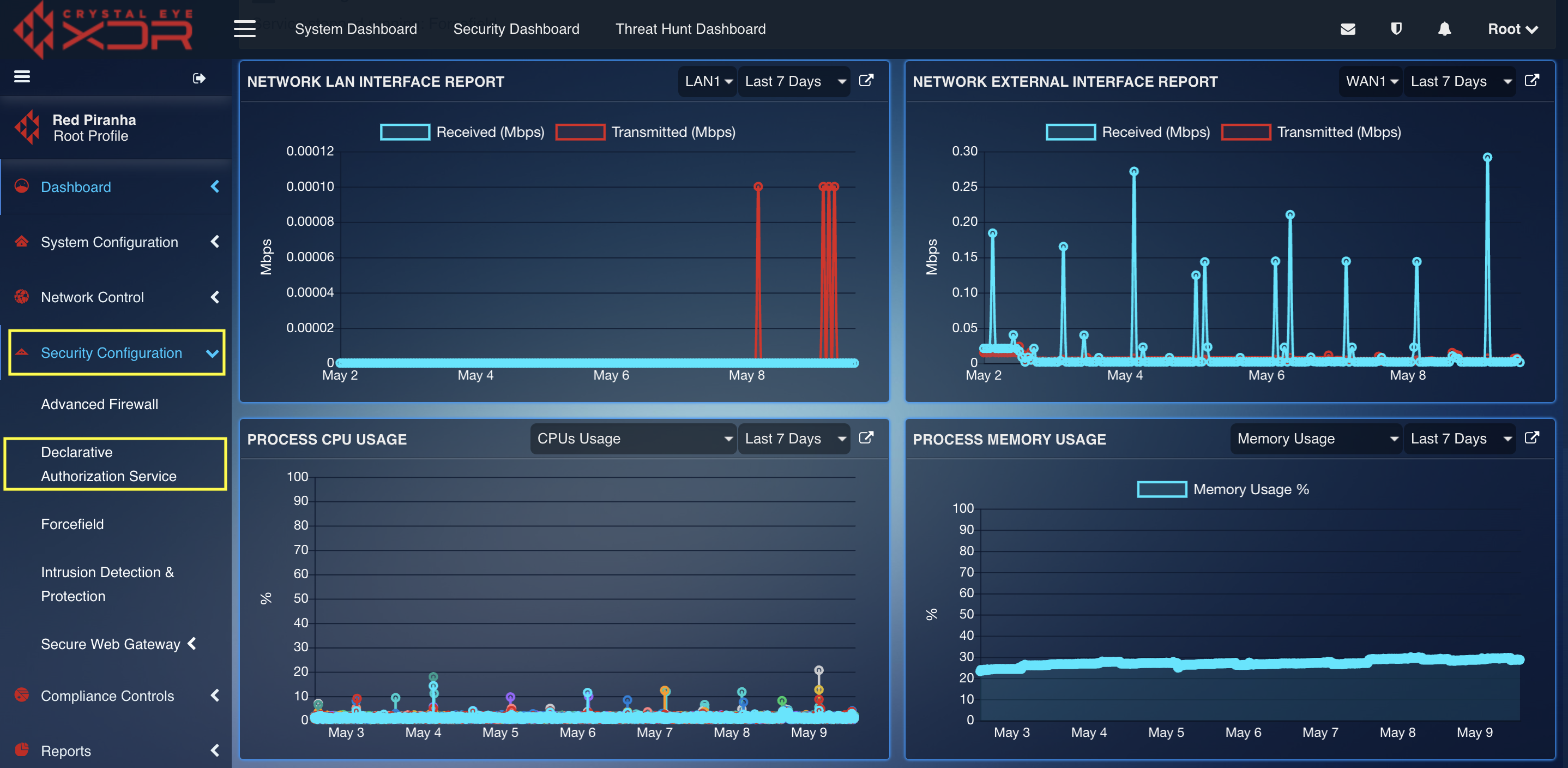
The Declarative Service Authorization application is not installed by default. You need to download it from the Marketplace and after installling can be accessed from the left-hand navigation panel.
Navigation to the Declarative Authorization Service Application
Left-hand navigation panel > Security Configuration > Declarative Authorization Service
Understanding the Dashboard
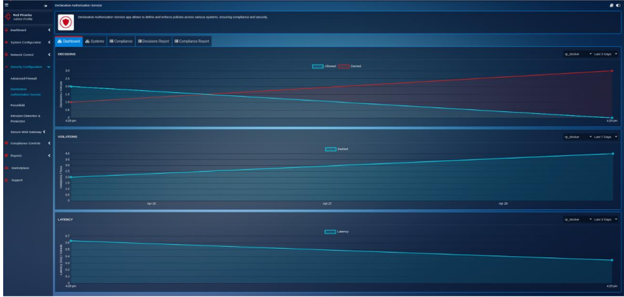
The DAS Dashboard provides real-time visibility into policy enforcement and system health across all connected systems. It includes four interactive graphs:
- Decisions vs Time: Displays the number of allow/deny decisions made by policy agents over a selected time range. It helps visualize policy activity patterns and understand authorization loads.
- Latency vs Time: Shows the response time of policy agents when making policy decisions. A spike here may indicate performance bottlenecks or overly complex policy logic.
- Errors vs Time: Tracks the number of errors encountered by policy agents during policy evaluation. The DAS validates rego rules.
- Violations vs Time: Reflects the number of policy violations detected (e.g., blocked actions, unauthorized access attempts). This helps in identifying compliance drift or repeated abuse patterns.
1. Create or Manage Policy Bundles
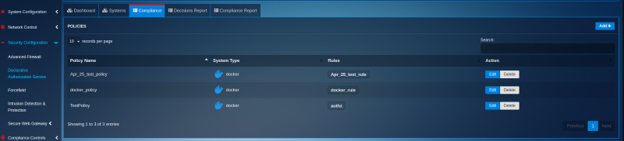
- Go to Compliance > Policies.
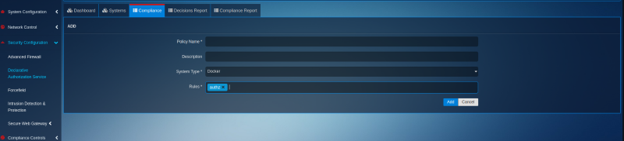
- Add/Edit/Delete policy bundles.
- Each policy includes:
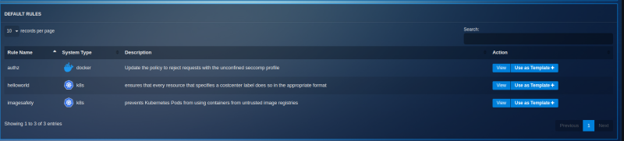
a. Rule Name & Description b. Status (Ignore/Monitor/Enforce) c. Rego Logic d. Custom parameters if applicable (e.g., allowed volumes)
2. Work With Default and Custom Rules
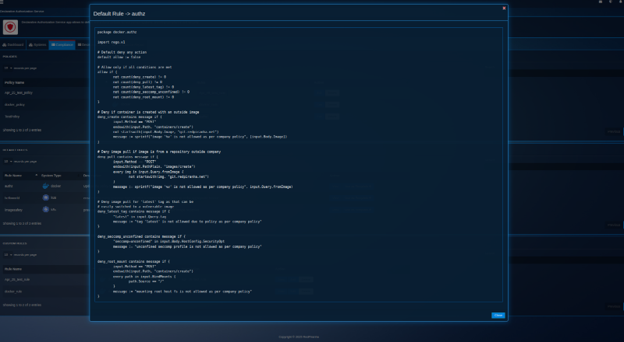
- Go to Compliance > Default Rules to use RP-provided templates.
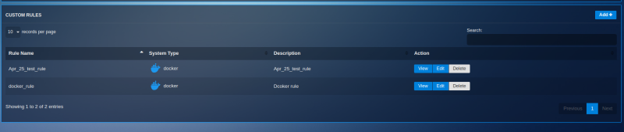
- Go to Compliance > Custom Rules to create your own rules.
- Use Add/Edit/View/Delete actions as needed.
3. Add a New System (e.g., Docker/Kubernetes)
- Go to Systems List tab.
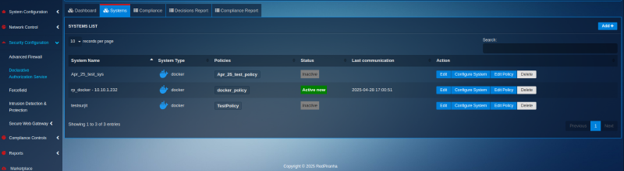
- Click Add System and fill in:
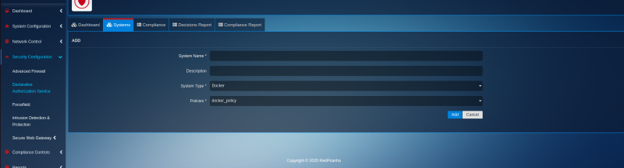
a. System Name b. System Type (Docker, Kubernetes, etc.) c. Description d. Associated Policies (select from predefined or local)
Follow the instructions shown to install the agent on the system (via curl/script). Status will change to Connected once communication is established.
4. Configure and Apply Policies
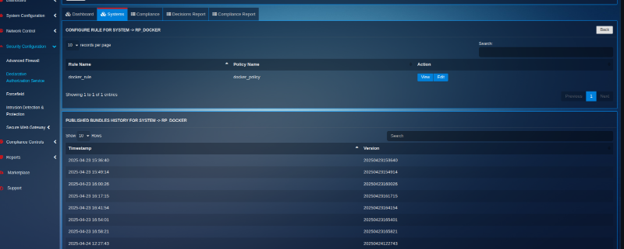
- Select the system and click Edit Rules.
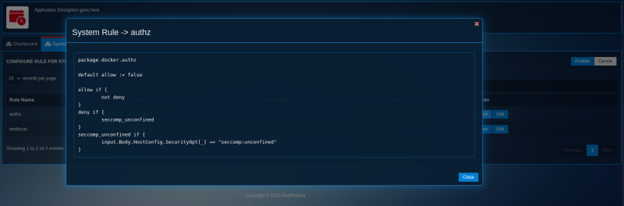
- View or modify existing rules written in Rego.
- To apply changes, click Publish.
- Each policy can be in one of two states: a. Draft b. Publish
When a user selects a system from the Systems List and clicks on the Configure Rule button, a detailed interface appears showing all the rules currently assigned to that system. This section provides full visibility into how policies are applied and enforced.
Each rule listed includes its name, description, status (Draft or Publish), and the Rego code that defines its logic. From this interface, the user can: - View Rule Details: Clicking the view icon opens a modal showing the full Rego policy code for inspection. - Edit Rule: The edit option allows users to modify the policy code directly in a popup modal. - Publish Rule: Once a rule is reviewed or modified, clicking the Publish button pushes the updated policy to the target system where the policy agent will enforce it.
This centralized interface simplifies policy management and ensures every rule is traceable and consistent with compliance goals.
5. Generate and View Reports
-
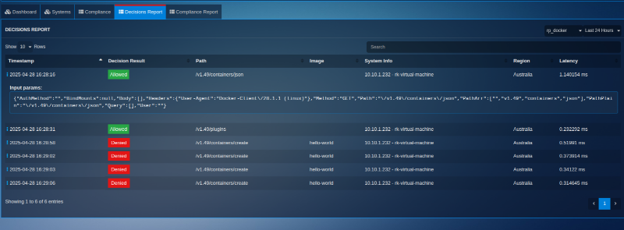
Go to Decisions Report to view authorisation outcomes from the policy agent.
-
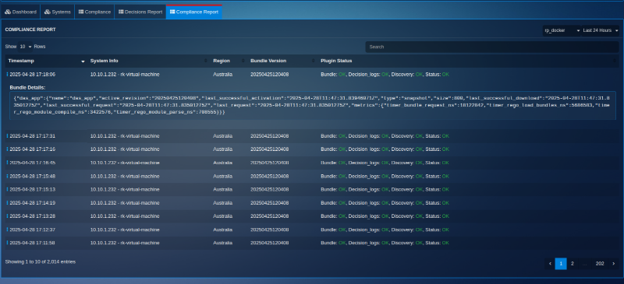
Go to Compliance Report to review policy deployment status and system compliance.
-
Security and Communication
- All communications between DAS and agents are secure via:
- HTTPS (TLS)
- Authentication (API Key)
-
CE Admin/root users have access control.
-
Data Retention and Logging
- Logs retained for up to 90 days with automated cleanup.
- Logged items include policy decisions, compliance results, and system states.
Crystal Eye DAS modernizes access control by offering real-time, unified, and declarative policy enforcement across containerized and cloud-native systems. With the policy agents as the enforcement engine and DAS as the governance layer, administrators gain clarity, control, and compliance assurance through a single pane of glass.