Overview
Crystal Eye XDRs AI and Escalation Reports displays Escalated IDPS Alerts, AV Alerts, Escalated AV Alerts and AI Alerts uplifting organisational threat monitoring and response capabilities.
Such optimized monitoring and response activities intended to find anomalies in the network through IDPS alerts, AV Alerts and AI Alerts reduces the risk of a breach and also ensures compliance with ISO 27002:2022 (Control 8.16 Monitoring Activities).
The human-machine teaming approach integrated into the CE XDR provides the capability to escalate anomalies detected in the IDPS alerts to Red Piranha’s Security Operations Team. Similarly, the AV Alerts also gets listed and can also be escalated and the list can then be reviewed under the Escalated AV Alerts section.
Note
All attack alerts can be escalated to Red Piranha’s Security Operations Team after the Incident Response Services application is installed. Escalations will not be processed until the Incident Response Services application is installed and configured. Click here to know how to configure the Incident Response Services application.
Navigation to AI and Escalation Reports
Go to Dashboard > Threat Hunt Dashboard > AI and Escalation Reports
AV Alerts
The Crystal Eye XDR appliance has an inbuilt Gateway Antivirus that examines and evaluates files as they transit in real time. The CE XDR makes use of a combination of signature and heuristic analysis to classify files to detect and automatically block malicious files to prevent infection from occurring.
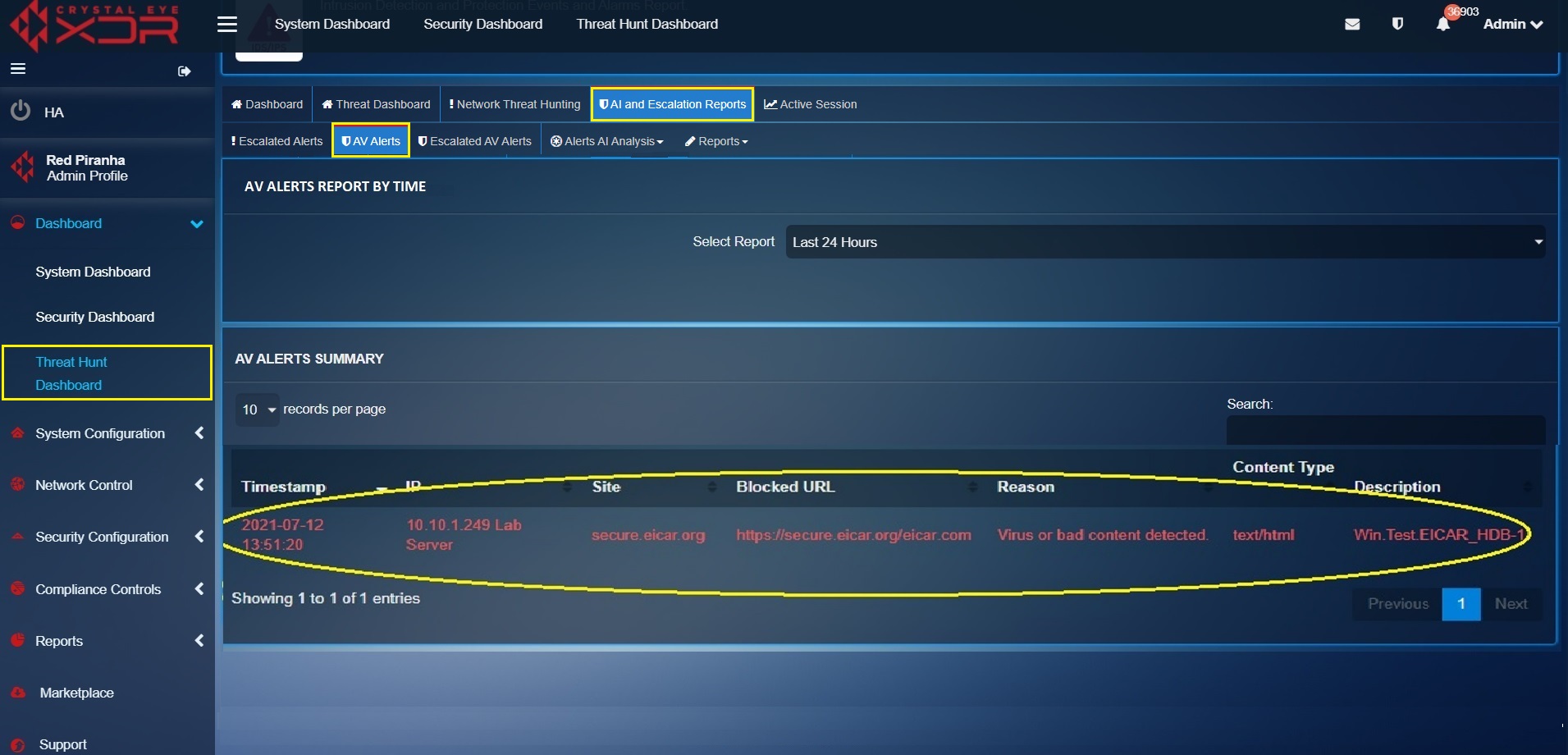
The AV Alerts Summary Report displays the AV scan summary specifying details regarding the malicious files that were blocked.
These details include Timestamp, IP Address (where the malicious files were detected), Site (domain name from where the malicious files originated), Blocked URL (URL of the blocked file), Reason (why the file was blocked), Content Type and Description (see screenshot below).
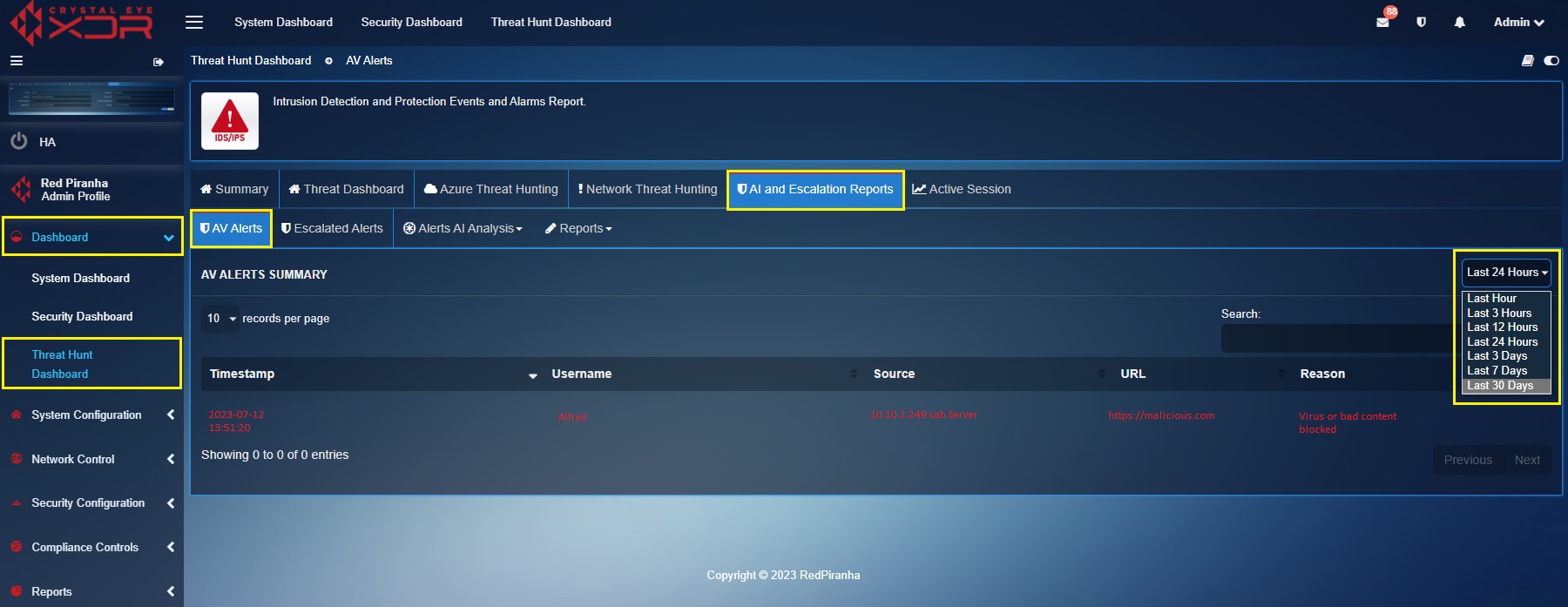
The AV Alerts Summary can be filtered using the time range dropdown. This feature can be used to analyse all the flagged bad content according to a particular time bucket (see screenshot below).
Note
The AV alerts can also be viewed under the scan summary section of the Security Dashboard. Know more here
Escalated Alerts
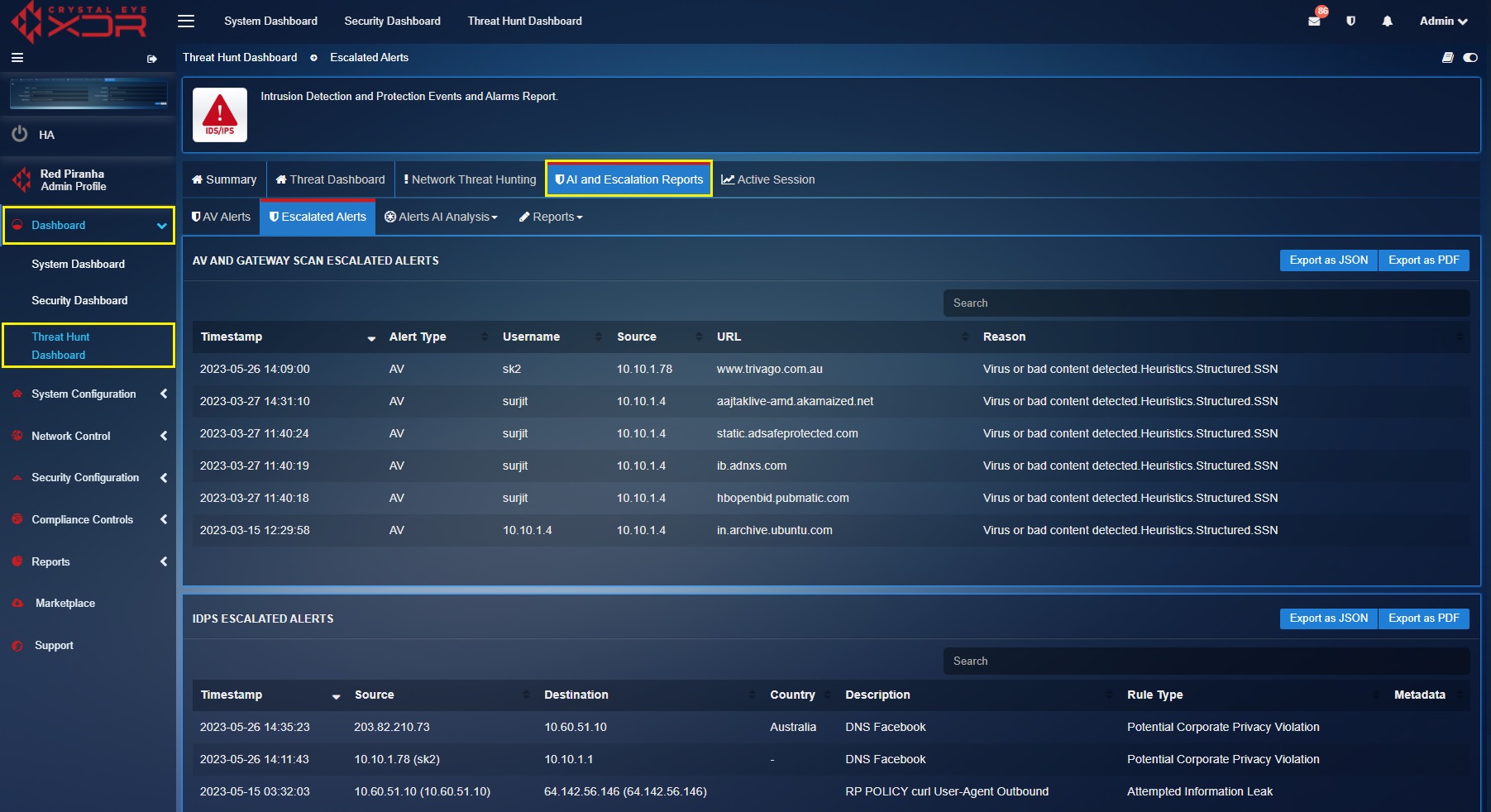
The Escalated Alerts section displays all AV & Gateway Scan Escalated Alerts and IDPS Escalated Alerts. The Crystal Eye XDRs response capabilities is integrated with its Managed Detection & Response licensing which enables administrators to escalate alerts to the global Security Operations Centre (SOC) of Red Piranha for further analysis, investigation, and response.
All escalated AV & IDPS Alerts are listed under this section making it convenient for the CE XDR administrator to keep a track of the escalations. A consolidated escalations report can be downloaded in PDF and JSON format.
AV & Gateway Scan Escalated Alerts
Each escalated AV & Gateway Scan alert displayed here has a Timestamp, Alert Type, Username (user assigned to the affected device), Source (IP address of the affected device), URL (malicious URL accessed by the user), and the Reason column (reflecting the information of the virus detected). Detailed report can be exported both in PDF and JSON format.
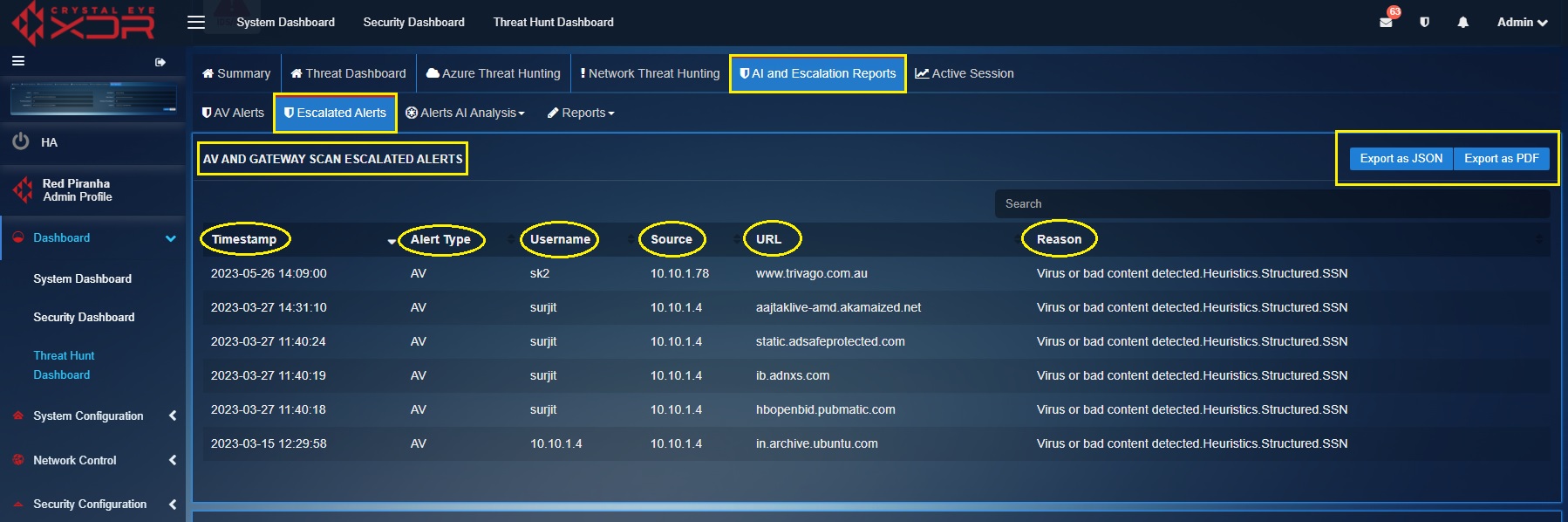
A PDF format report of the escalated AV & Gateway Scan alerts can be exported in JSON and PDF format. Click the highlighted buttons as shown in the screenshot above.
The PDF format of the Escalated AV Alerts Report sheds light on various components of the AV alerts such as Timestamp, IP address of the end client where the malware was detected, the URL from where the malware infection originated and the description of the quarantined malware (screenshot below). 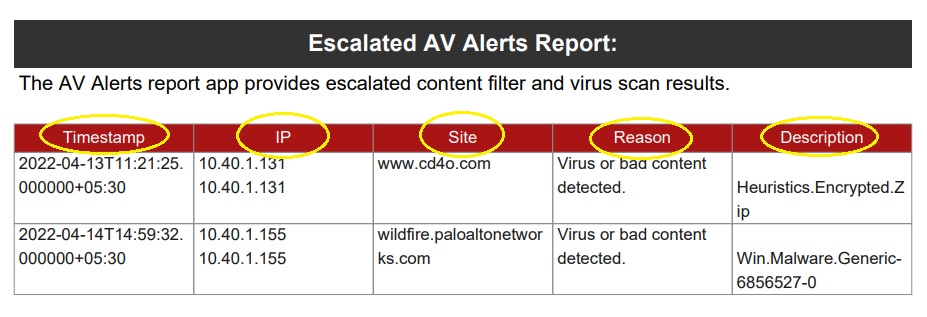
IDPS Escalated Alerts
Each escalated IDPS alert displayed here has a Timestamp, Source IP, Destination IP, Country of Origin, description of the triggered IDPS alert and the Rule Type that triggered the IDPS alert (screenshot below). Detailed report can be exported both in PDF and JSON format. Learn how to escalate IDPS alerts to Red Piranha’s Security Operation’s Team here.
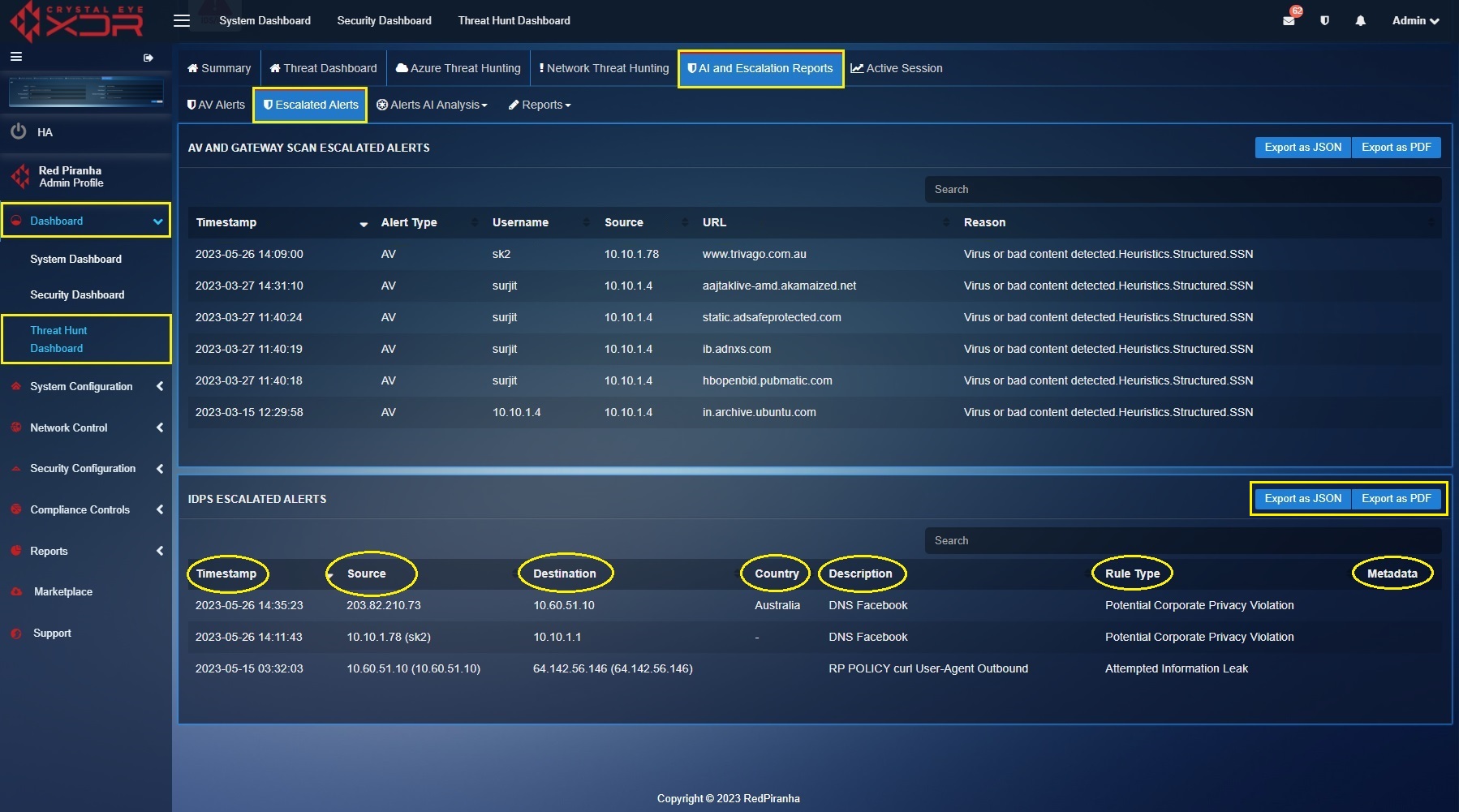
A PDF format report of the Escalated IDPS Alerts can be exported in JSON and PDF format. Click the highlighted buttons as shown in the screenshot above.
The PDF format of the Escalated IDPS Alerts Report sheds light on four major components of the alerts such as the Timestamp, Source IP, Destination IP and the Description (of the alert). Refer the following screenshot to view the report in pdf format. 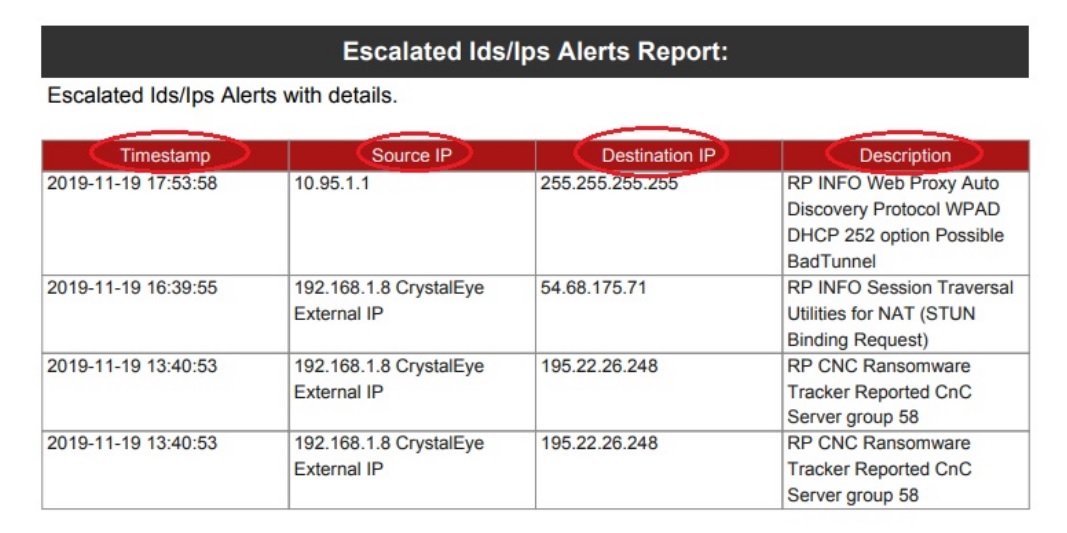
Alerts AI Analysis
Crystal Eye XDRs machine learning features are aimed at detecting anomalies often found and associated with attackers undertaking lateral movement during pivoting.
The alert AI analysis of the CE XDR is based on the Human-in-the-Loop (HITL) model which allows humans to give direct feedback to the Alert AI analysis module to improve its overall capability to detect anomalies.
The aim here is to find anomalies in traffic patterns that rule based signatures might miss, making it easier for SOC and threat hunt teams to detect advanced persistent threats and zero-day attacks.
AI analysis needs sufficient data to build initial baseline for anomaly detection. It generally takes minimum 7 days. Once the system has created a baseline, a user should then train the ML detection engine and the system to increase its accuracy for anomaly detection.
AI Threat Detection for SSH, SID, SMB, and KRB
AI SSH Feature in Crystal Eye
1. Introduction
The AI SSH feature in Crystal Eye enhances the platform’s security monitoring by adding behavior-based anomaly detection to SSH traffic. While traditional security mechanisms focus on external threats at the network perimeter, this feature extends visibility deep into internal SSH connections, helping detect unauthorized access, compromised credentials, and insider threats. By employing machine learning algorithms, Crystal Eye builds a behavioral baseline for each user and flags deviations, enabling early detection and response to abnormal activities.
2. Purpose and Scope
Crystal Eye already monitors incoming SSH connections at the WAN interface using its Forcefield application. It blocks unknown or suspicious IP addresses attempting to establish SSH sessions with internal systems. However, this perimeter-focused approach is insufficient in detecting threats originating from within the network. The AI SSH module addresses this gap by monitoring internal SSH connections across LAN-to-LAN, LAN-to-WAN, and WAN-to-LAN scenarios.
The primary goal of the AI SSH feature is to understand and model the normal behavior of internal users and devices based on historical SSH activity. Once a behavioral profile is built, the system can identify deviations such as a user accessing a new server or connecting at unusual times and raise alerts. These insights are particularly valuable for detecting insider threats or credential misuse, which are often missed by conventional rule-based systems.
3. Internal SSH Traffic Monitoring
The AI SSH system continuously monitors and classifies SSH connection events. For each SSH session, it captures metadata such as source and destination IP addresses, ports, interface used, and SSH protocol details. Sample event types include:
- LAN to LAN: Internal user accessing another internal system
- LAN to WAN: Internal user initiating a connection to an external server
- WAN to LAN: External device accessing an internal resource
To accurately filter and classify internal SSH traffic, a connection parser processes event logs by applying subnet-based IP matching and interface tagging. The system excludes SSH tunnels in this release, focusing solely on direct point-to-point connections over Ethernet or Wi-Fi interfaces.
Data is collected hourly, and each SSH event is stored in the database with all relevant fields. This enables centralized storage, efficient querying, and scalable analytics.
4. Baseline Creation and Learning Period
To build a reliable model of normal SSH behavior, Crystal Eye requires a learning period of four to five weeks. During this time, the AI SSH module observes each user’s activity patterns such as login frequency, accessed servers, and session duration. These historical records are used to train an unsupervised machine learning model, which clusters behaviors based on similarity.
For example, if an administrator typically accesses a certain set of servers during working hours, that pattern is recorded and normalized. Any future deviation such as accessing a new server or logging in at an unusual time can be detected by comparing the new activity against the established baseline.
This baseline formation is critical to reducing false positives. Instead of relying on predefined rules or signature databases, the model adapts to the unique operational context of each user, system, or network segment.
5. Data Pre-Processing for Machine Learning
Before training the model, raw SSH log data must be converted into a machine-readable format. The preprocessing phase cleans the data, eliminates redundancies, and translates categorical attributes into numerical representations. Protocol versions, software identifiers, and interface labels are encoded to support clustering and anomaly detection.
Processed data is formatted to include time-series records of user activities, making it suitable for feeding into clustering algorithms. The quality and consistency of this step significantly influence the model’s accuracy and detection capabilities.
6. Model Training Using Supervised Learning
The AI SSH feature employs a clustering-based Local Outlier Factor (LOF) algorithm to train behavior models. This algorithm groups SSH activity into clusters based on historical patterns, assigning each user or IP address a profile of typical behaviors.
Over time, as more data is collected, the model becomes more accurate in identifying legitimate usage patterns. When a new SSH session is established, the system evaluates whether the behavior fits within the existing clusters. If it does not, the session is marked as an outlier and investigated further.
The use of supervised learning means there is no need for manual labeling of data or creation of static rules. Instead, the model self-adapts and evolves with organizational activity.
7. Real-Time Monitoring and SIEM Integration
Once the model is built, the AI SSH module operates in real-time. Every hour, it retrieves the latest SSH events and compares them to the user’s behavioral baseline. If an activity is found to be anomalous, it is flagged and immediately reported.
These anomaly alerts are sent to the Crystal Eye SIEM and are also visible in the Intrusion Detection System (IDS) and Intrusion Prevention System (IPS) GUI interfaces. Each alert includes detailed metadata about the event, the reason for classification as anomalous, and a confidence score based on how far it deviated from the norm.
By integrating directly with the SIEM, the AI SSH system supports centralized visibility, rapid incident response, and forensic investigation, making it easier for administrators to assess and react to potential threats.
8. Conclusion
The AI SSH Feature in Crystal Eye marks a significant leap in SSH security monitoring. It shifts the focus from static signature detection to dynamic behavior modeling, allowing organizations to detect abnormal access attempts that would otherwise go unnoticed. By tracking SSH traffic inside and outside the perimeter and applying machine learning to user behavior, Crystal Eye provides early warnings about potential breaches, insider threats, and lateral movement.
This proactive approach not only strengthens security posture but also simplifies threat hunting and compliance reporting. With real-time alerts, integrated dashboards, and scalable machine learning, the AI SSH module brings intelligent automation to one of the most critical aspects of network security.
AI SID Feature in Crystal Eye
1. Introduction
The AI SID (Signature ID) feature in Crystal Eye enhances the platform’s intrusion detection capabilities by automatically profiling common signature activity observed within an organization’s network environment. It is particularly useful in helping security teams identify shifts in attacker behavior or abnormal signature occurrences that traditional systems might overlook due to static baselines.
2. Purpose and Scope
Every IDS/IPS system uses unique Signature IDs (SIDs) to classify threat behaviors based on known patterns. However, in a dynamic network, many of these SIDs can occur regularly as part of benign activity. The AI SID module in Crystal Eye intelligently learns which SIDs appear frequently and in what context such as time of day, source IP, or user behavior. It builds a supervised learning model to track these SIDs over time and develop a behavioral baseline.
The system automatically detects if new or rarely seen SIDs start appearing in the event stream. For instance, if a network suddenly exhibits activity from a SID related to a reconnaissance or exploit pattern not seen in previous weeks, the system highlights this deviation.
3. Baseline Training and Supervised Learning
The AI engine begins training as soon as the system is deployed. Over a period of 2 to 8 days, the system builds a model of the top recurring SIDs by tracking user and system behaviors. This model is refined using supervised learning, allowing security teams to adjust and confirm whether a flagged SID is indeed anomalous or part of normal network operations.
Once marked as safe, the behavior is updated in the model. This constant tuning of the baseline ensures that the system becomes more accurate over time, reducing false positives and surfacing high-confidence threats.
4. Anomaly Detection and Alerting
When a SID that deviates from historical patterns is detected—such as a critical alert suddenly appearing during off-hours or being triggered by an unusual IP—the system classifies it as anomalous and sends an alert to the Crystal Eye SIEM. This ensures timely investigation into potential threats that may indicate exploitation, policy evasion, or lateral movement attempts.
The AI SID feature significantly enhances situational awareness by shifting from reactive signature matching to proactive behavioral analysis of how SIDs behave over time.
AI SMB Feature in Crystal Eye
1. Introduction
The AI SMB feature in Crystal Eye provides automated anomaly detection for Server Message Block (SMB) protocol activity. SMB is commonly used for file sharing within internal networks but is also a favored protocol for lateral movement by threat actors. This feature helps identify abnormal usage patterns and unauthorized data access attempts within SMB traffic.
2. Purpose and Scope
While SMB is essential for internal collaboration, its misuse often goes undetected because it relies on trusted relationships between devices. The AI SMB module establishes what “normal” SMB behavior looks like for each user, system, and time period. Over several days, Crystal Eye records and learns typical access patterns such as which users normally access which shares, at what time, and from which endpoints.
Once a stable baseline is established, the system flags deviations like an unexpected workstation accessing a domain controller, unusual file access during off-hours, or abnormal spike in data transfer activity.
3. Baseline Formation and Continuous Learning
The system uses supervised learning to build and refine SMB usage models. The learning process takes place over a span of 2 to 8 days and continues to update as new traffic is observed. If an activity initially flagged as anomalous is later verified as legitimate by a security analyst, it can be marked as normal behavior, allowing the model to adjust accordingly.
This continual model refinement minimizes unnecessary alerts while increasing accuracy in spotting real threats such as internal reconnaissance, privilege abuse, or credential reuse.
4. Anomaly Detection and Response
When SMB activity deviates from learned behavior, the AI module flags the event and notifies the Crystal Eye SIEM. Alerts include contextual metadata such as the source/destination IP, share accessed, time of access, and anomaly score. Security teams can quickly investigate whether the behavior suggests suspicious activity like worm propagation, unauthorized share access, or attempts to copy sensitive data across the network.
By automatically detecting and highlighting deviations in SMB activity, this feature significantly reduces dwell time and improves lateral movement detection within enterprise networks.
AI KRB Feature in Crystal Eye
1. Introduction
The AI KRB (Kerberos) feature in Crystal Eye brings advanced behavioral analysis to authentication monitoring, with a focus on identifying misuse of the Kerberos protocol, a critical component of domain-based authentication in enterprise environments. This is particularly important given that Kerberos is often abused during credential theft and lateral movement attacks.
2. Purpose and Scope
Kerberos events are highly sensitive because they govern trust and authentication within Active Directory environments. The AI KRB module monitors Kerberos traffic to understand normal authentication behavior at the level of ticket requests, issuance patterns, service usage, and inter-machine communication.
The system learns what a normal Kerberos ticket request looks like for a user or device. For example, it expects a developer’s workstation to request tickets for access to a code repository during working hours, but not to a domain controller or file server at 2:00 AM.
3. Baseline Learning and Model Adaptation
Similar to SID and SMB, the AI KRB model uses supervised learning to build a baseline for authentication behavior. Over an initial training window of two to eight days, the system observes which services are commonly requested, the frequency and timing of ticket requests, and cross-references this with machine and user identity metadata.
When a user or system performs a Kerberos operation that significantly deviates from their profile such as requesting tickets to services never accessed before or generating an unusually high volume of requests, the system marks it as anomalous.
The supervised learning process also allows administrators to confirm or dismiss flagged anomalies, continually enhancing model accuracy and adaptability.
4. Threat Detection and Alerting
If Crystal Eye detects a Kerberos event that breaks the established behavioral model, it triggers an alert and forwards the incident to the Crystal Eye SIEM. This can include behaviors consistent with Golden Ticket attacks, ticket forging, or anomalous service-to-service authentications.
Because Kerberos is integral to identity and access control, any anomaly in this space can signal early stages of an advanced attack. By correlating Kerberos anomalies with other protocol behaviors, Crystal Eye provides a powerful lens for uncovering multi-stage intrusions.
AI Analysis for SID Anomaly Alerts
Signature Identity (SID) is a unique identification number auto assigned to an IDPS Policy rule. These rules are conceptualised and created by the security operations team of Red Piranha to provide context to the Intrusion Detection & Protection (IDPS) mechanism of the Crystal Eye XDR.
One of the most important functions of the IDPS signature rules is to specify the component of the network traffic that the system must inspect to detect attacks. An IDPS action is triggered if a rule is matched with specific pre-defined attack patterns. The IDPS system performs the assigned action which helps in protecting the Crystal Eye network.
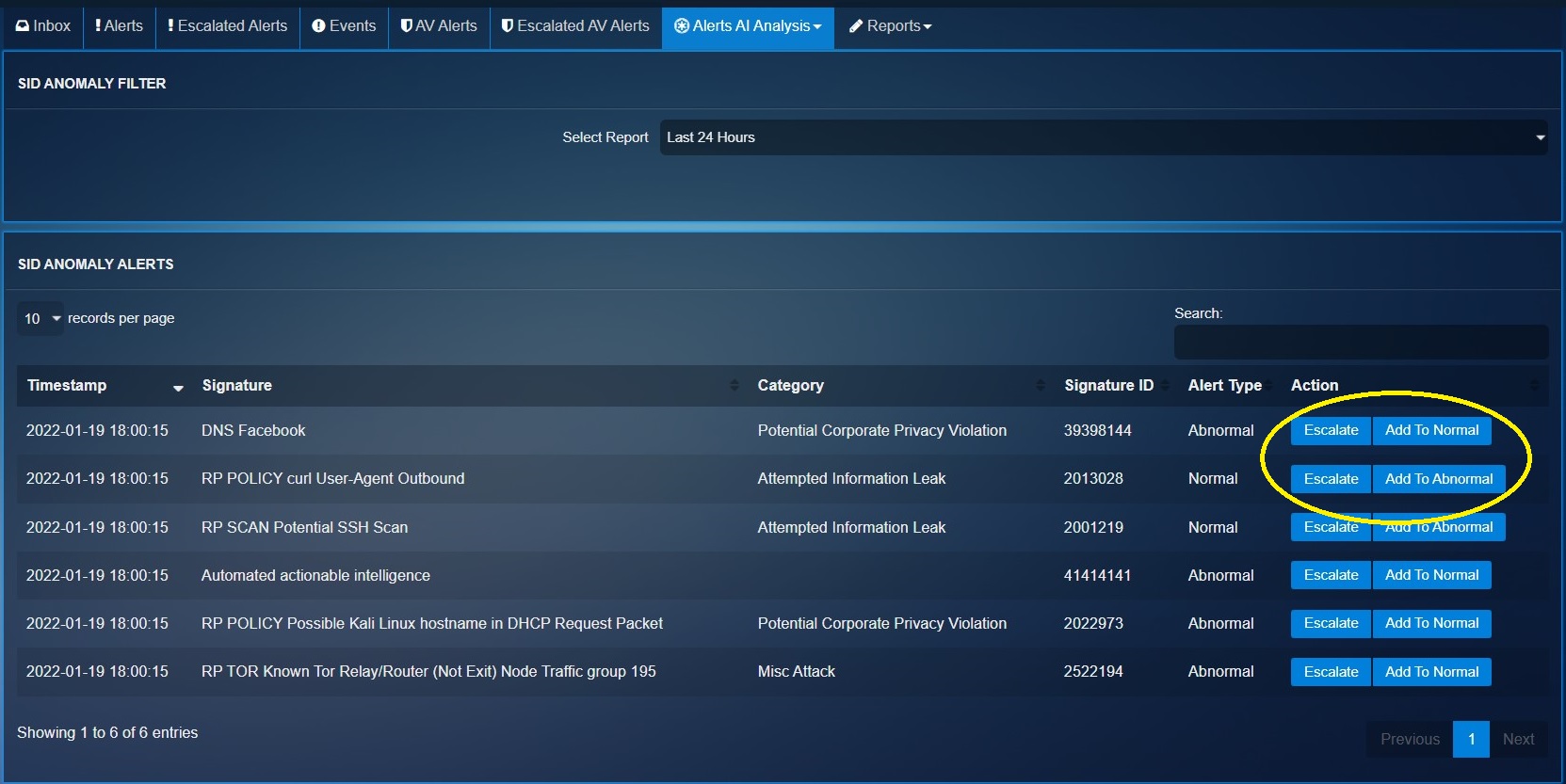
The Alert AI Analysis module of the Crystal Eye XDR is designed to identify SID anomaly alerts and display it in the SID anomaly alerts section tagged with a Alert Type (Abnormal or Normal).
The machine learning module works such that the CE XDR administrator can be the human-in-the-loop component providing quality inputs to train the system to reduce IDPS policy rules related false positives. This can be done by adding the SIDs to the normal or abnormal behaviour bucket. A SID anomaly can also be escalated to the Red Piranha Secops team from this section.
Note
Escalations will not be processed until the Incident Response Services application is installed and configured. Click here to know how to configure Incident Response Services application.
The screenshot below shows the list of possible SID anomaly alerts, the Escalate button, Add to Normal Bucket button, and Add to Abnormal Bucket button.
AI Analysis for SSH Protocol Alerts
A given network might have legitimate set of SSH users (mostly system administrators). These internal users would mostly use SSH protocol to establish secure command-line sessions with network devices such as firewall, routers, and switches.
The machine learning module of the CE XDR can be trained to detect malicious SSH attempts in the network by manually labelling the SSH related anomaly. The manual intervention to train the ML module of the CE XDR ensures that it is the recipient of high-quality data. The machine learning algorithm learns to make decisions from this data ensuring that it flags an anomaly such as a sudden spike in SSH requests originating from an internal IP address.
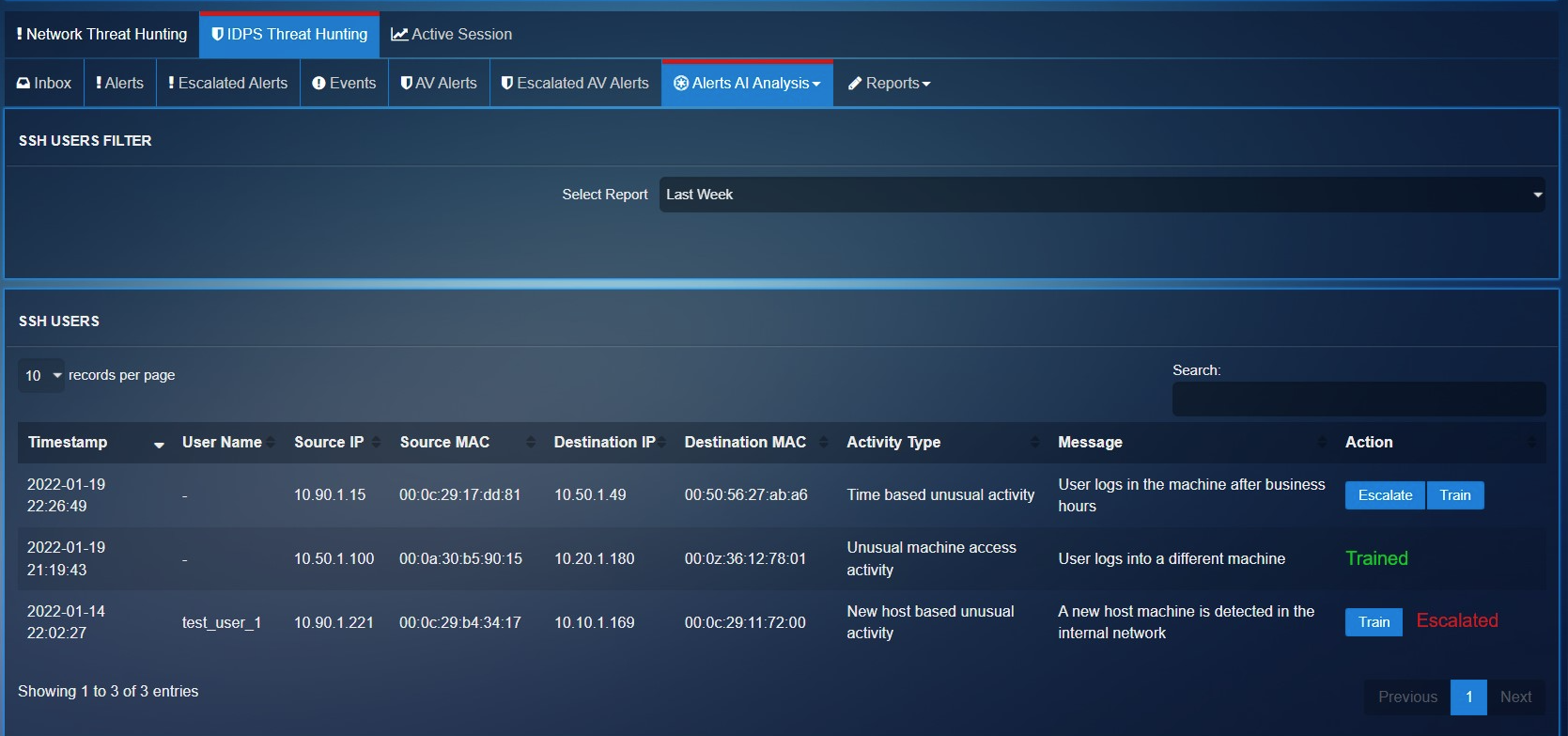
The system creates baselines of traffic flow based around network traffic that is key in the attacker gaining persistence and a foothold in a network. Such user behaviour flagged as abnormal and labelled as an anomaly will be displayed in the SSH Users section. The Train button below can be used to train the ML module of the CE XDR. The Escalate button can be used to share vital SSH users related anomalies with the security operations team of Red Piranha (See screenshot below).
Note
You may view the Alert AI Analysis for SSH Protocol by selecting SSH from the Alerts AI Analysis dropdown.
Scheduling AI Reports Via Email
AI Alert Reports can be scheduled and sent to a designated email address. These periodic reports help in maintaining a cyclic monitoring process of analysing AI alerts avoiding incidents that might disrupt the smooth functioning of the business.
Pursue the following steps to schedule an AI Alert report and get it delivered on a designated email address.
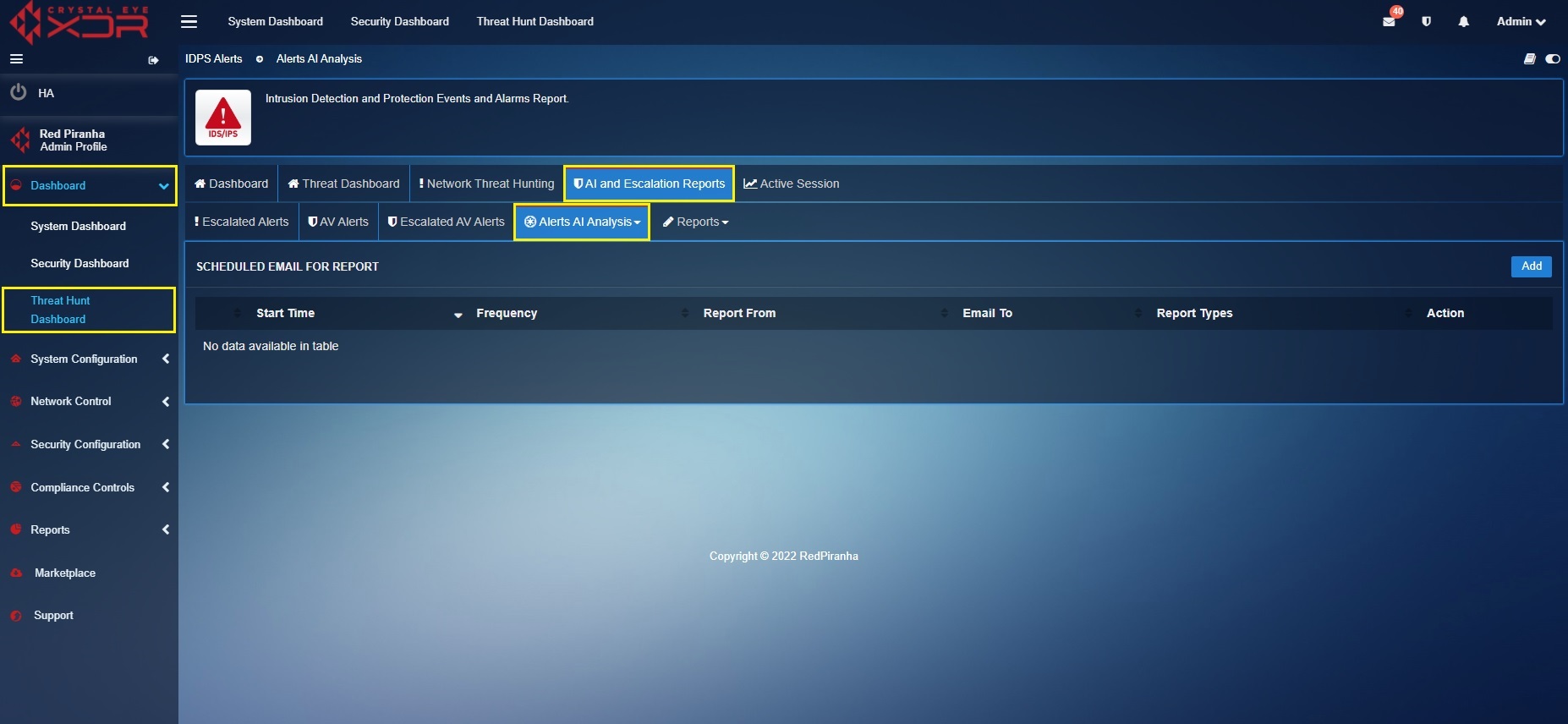
Step 1: Go to Threat Hunt Dashboard > AI and Escalation Reports and click the Alerts AI Analysis dropdown button
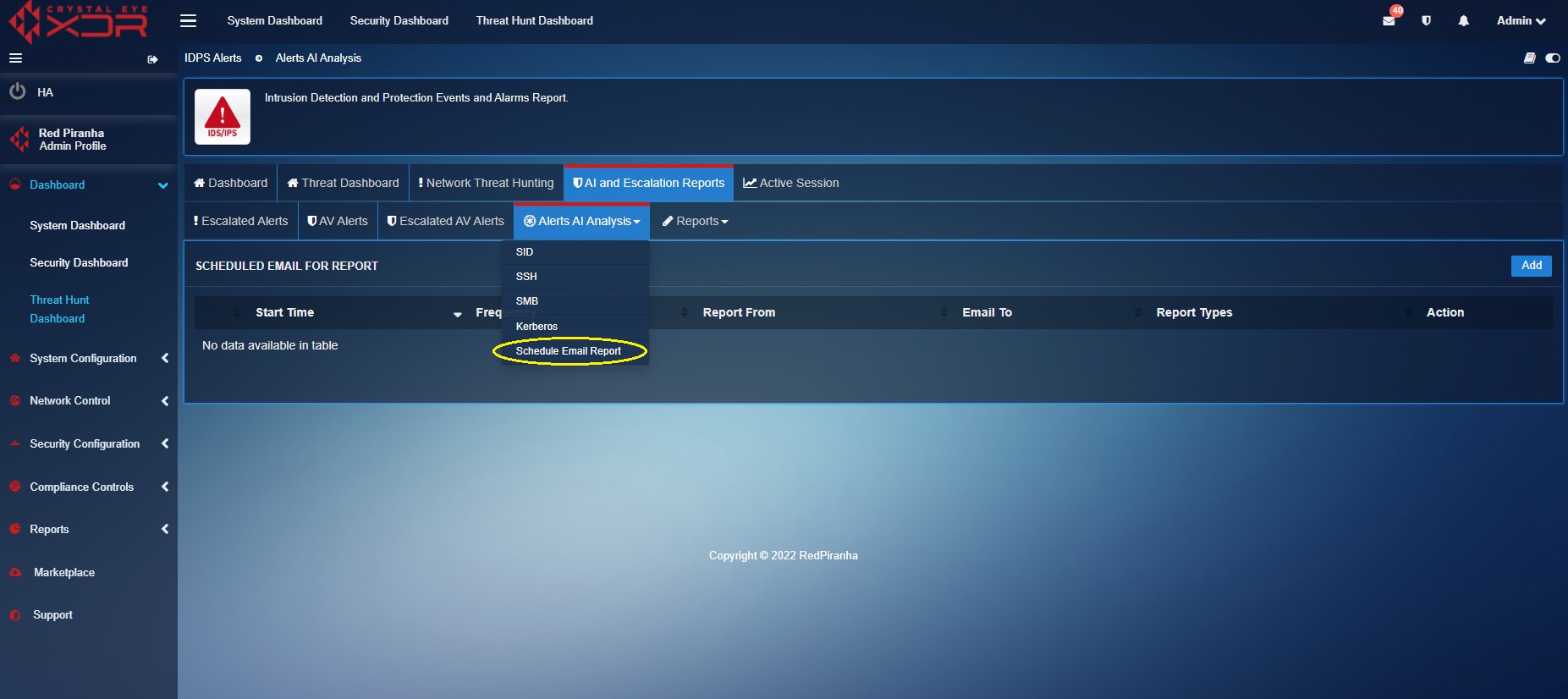
Step 2: Select Schedule Email Reports from the Alerts AI Analysis dropdown.
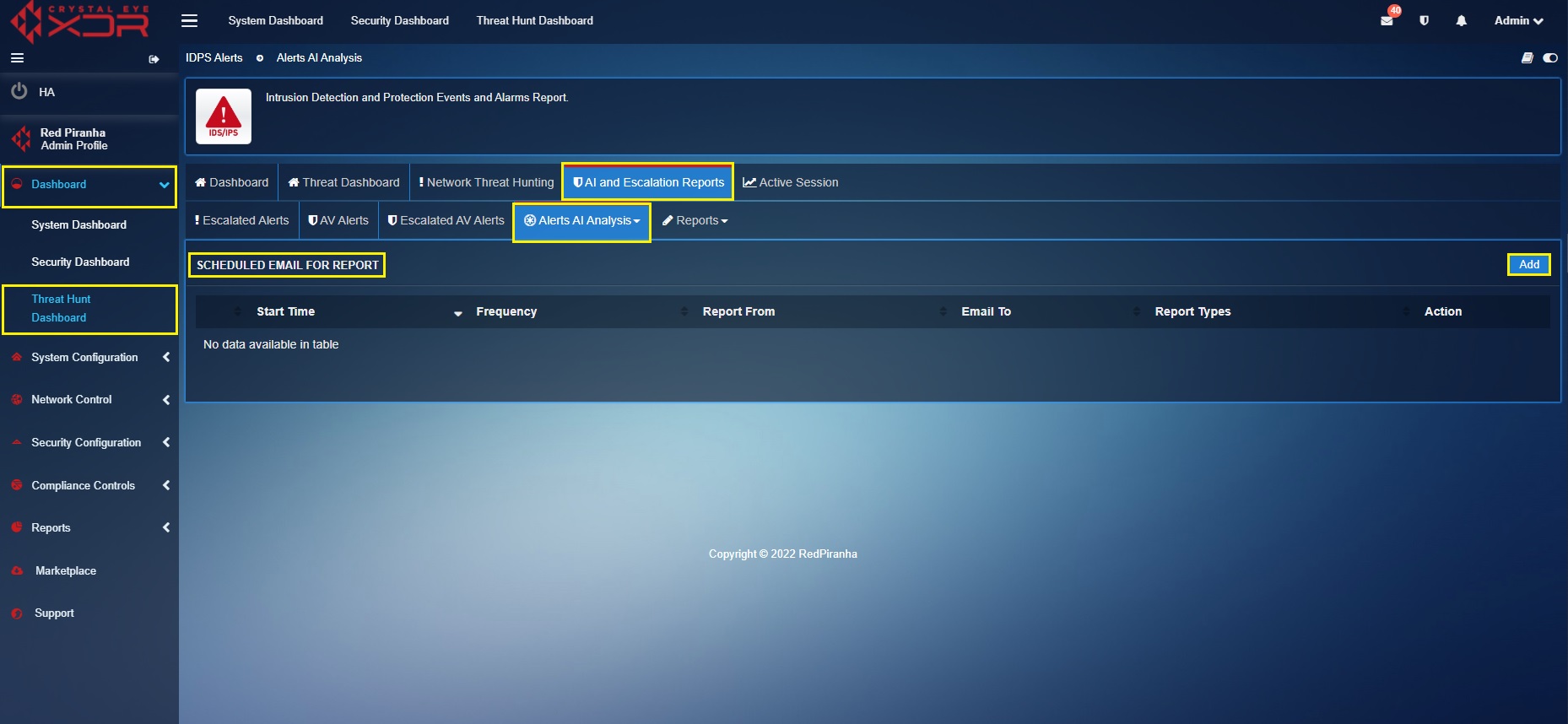
Step 3: You will now see the scheduler. Click the Add button on the top-right corner of the Scheduled Email for Report section.
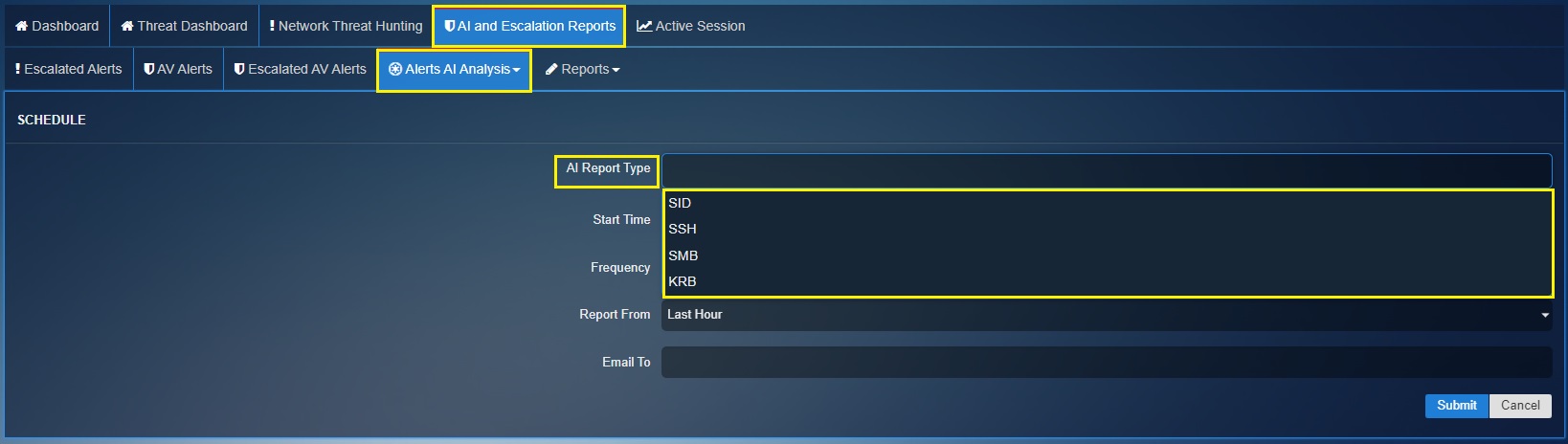
Step 4: You will see AI Report Type (such as SID, SSH, SMB and KRB) listed in the dropdown. Select the required AI Report Type.
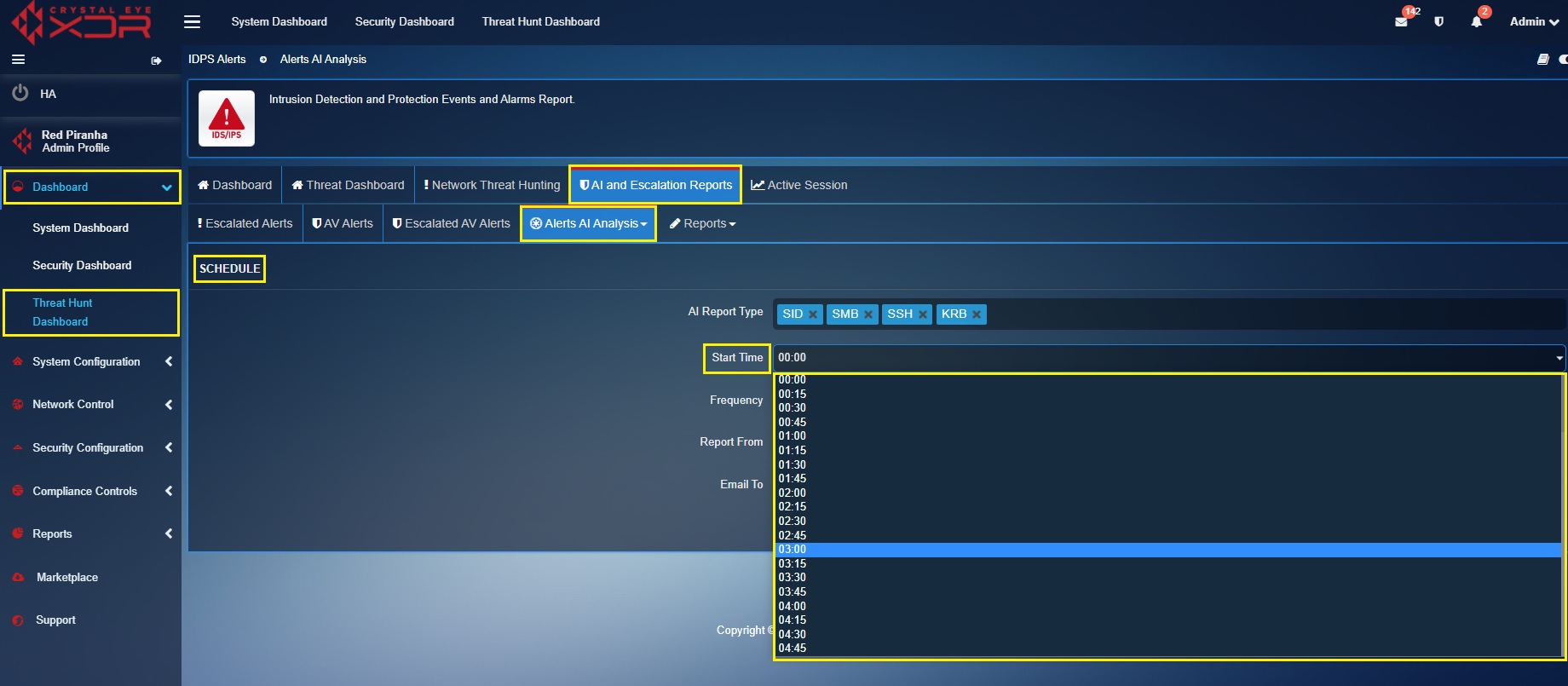
Step 5: Specify the time at which you want the report to be triggered and sent to your email address.
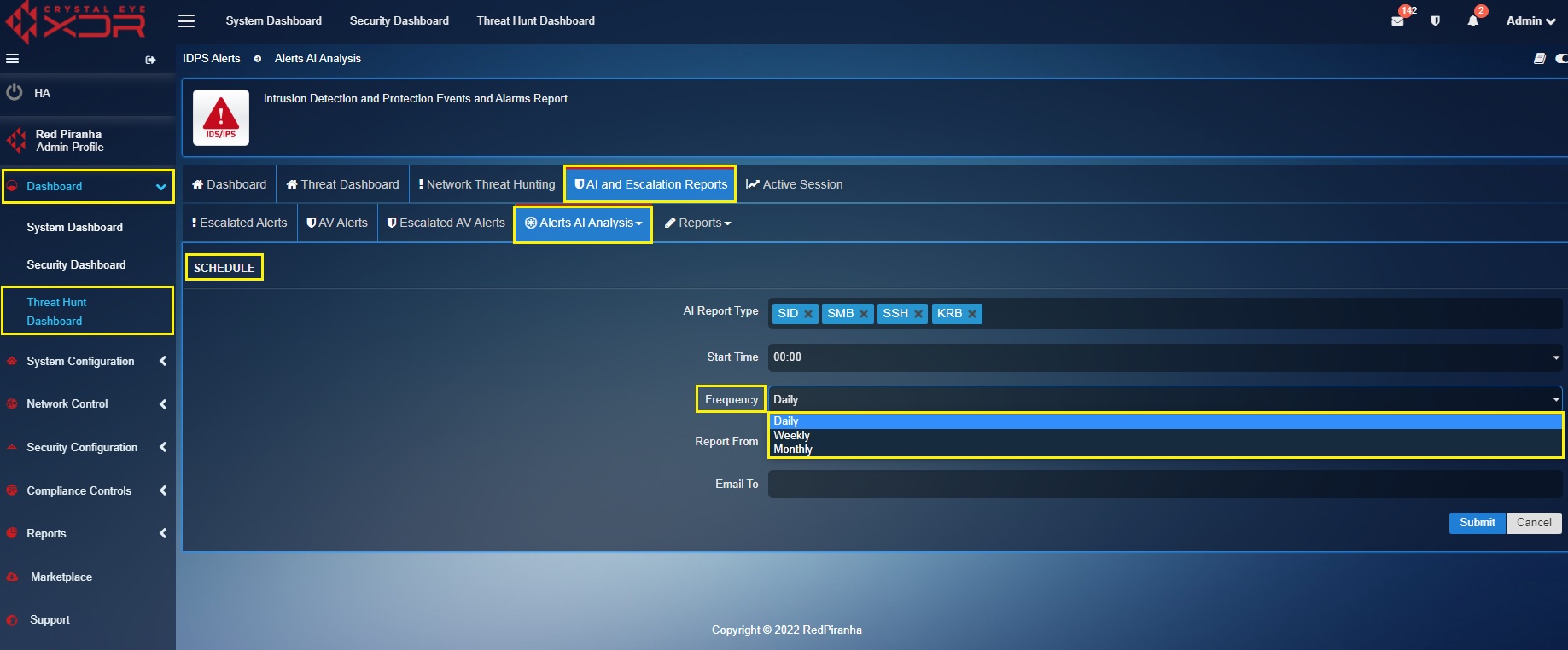
Step 6: Select the frequency at which the report is to be sent to the email address of your choice.
Note
The frequency of the reports can be set to Daily, Weekly or Monthly.
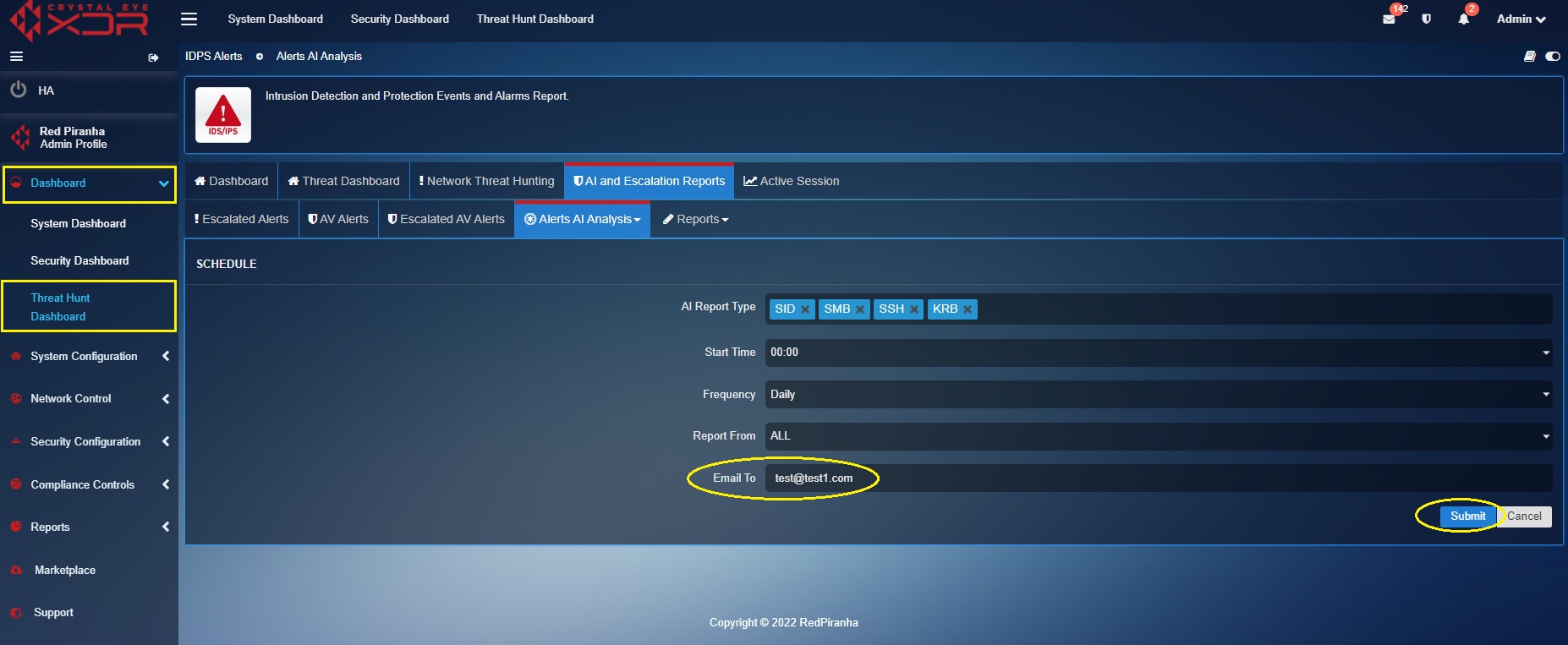
Step 7: Enter the email address in the textbox where you want to receive the AI Alerts Reports and click the Add button.
Scheduling IDPS Events Summary Report Via Emails
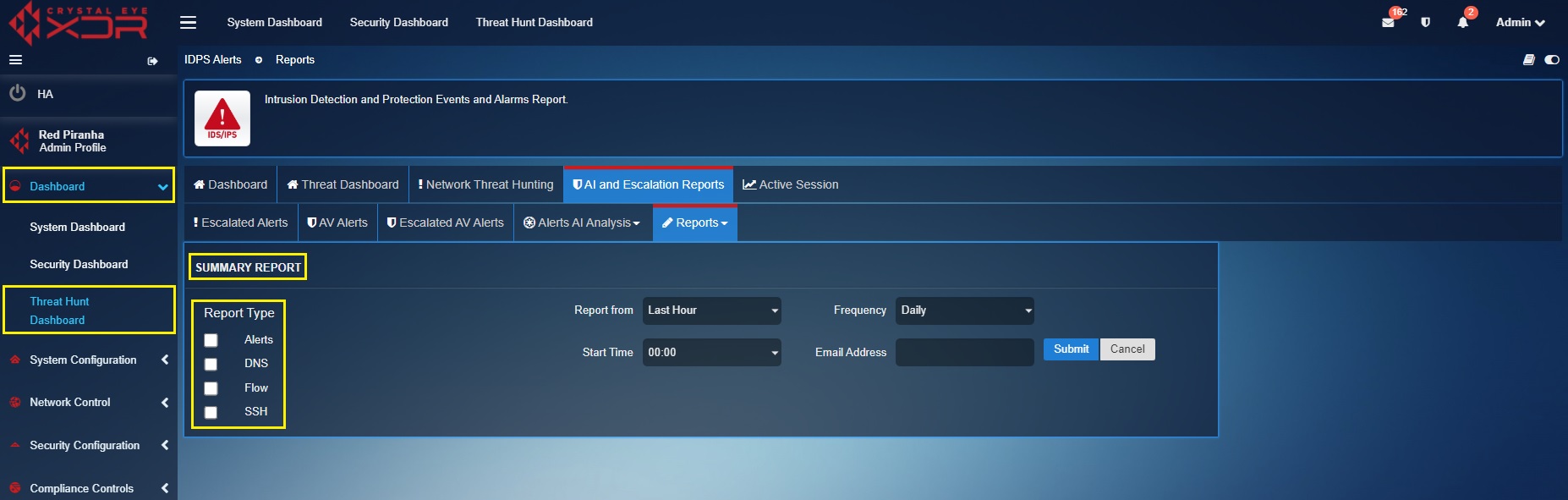
The Crystal Eye XDR can be configured to schedule IDPS Events Summary Reports via emails. The report consists of event types such as Alerts, DNS, Flow and SSH.
How to schedule an IDPS Events Summary Report via Emails?
Checklist before scheduling IDPS Reports: Go to System Configuration > Mail Settings, you will see SMTP/E-MAIL notification settings. Use the Test Feature to check whether the mail settings are as per your email domain settings. In order to do so, click the TEST Button as mentioned in the screenshot below.
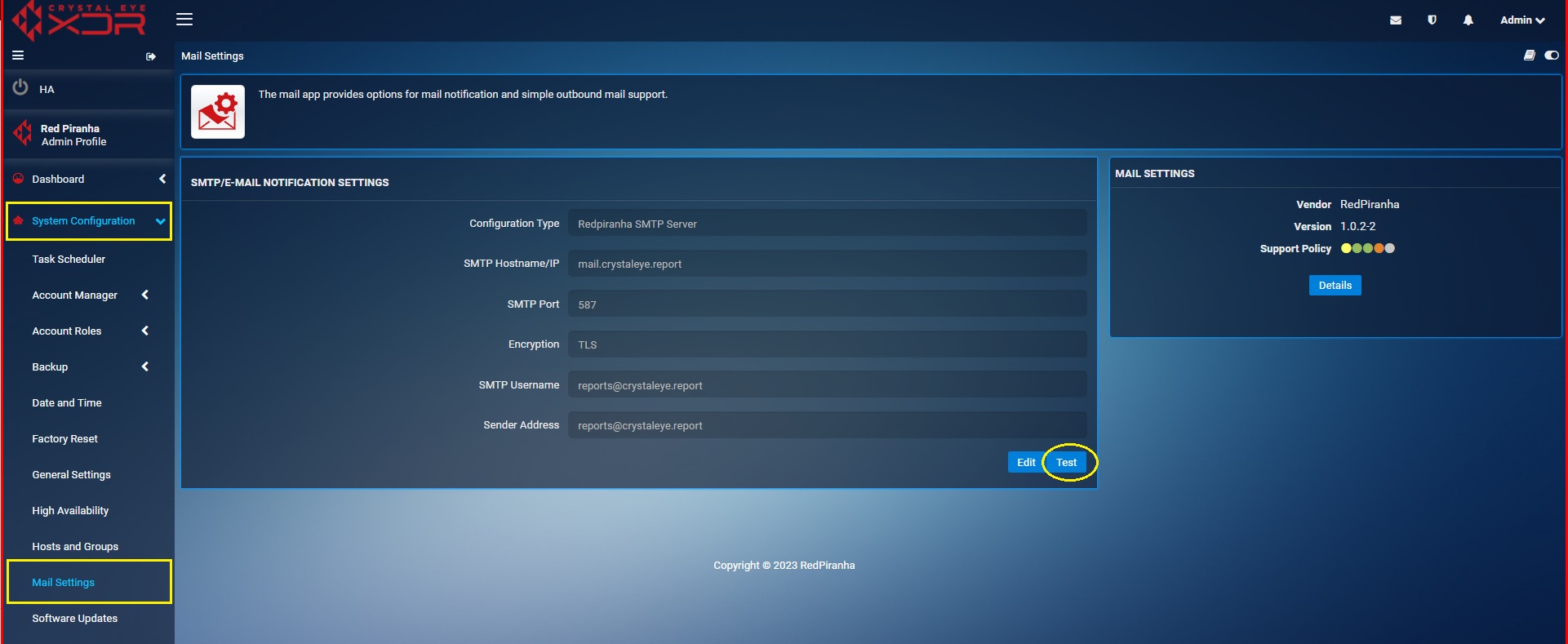
You will now see the Notification Test page. Enter you email address and click Send Now button. The system will now let you know whether the email address matches your domain configuration. If not, please configure your domain settings in SMTP/E-MAIL notification settings page.
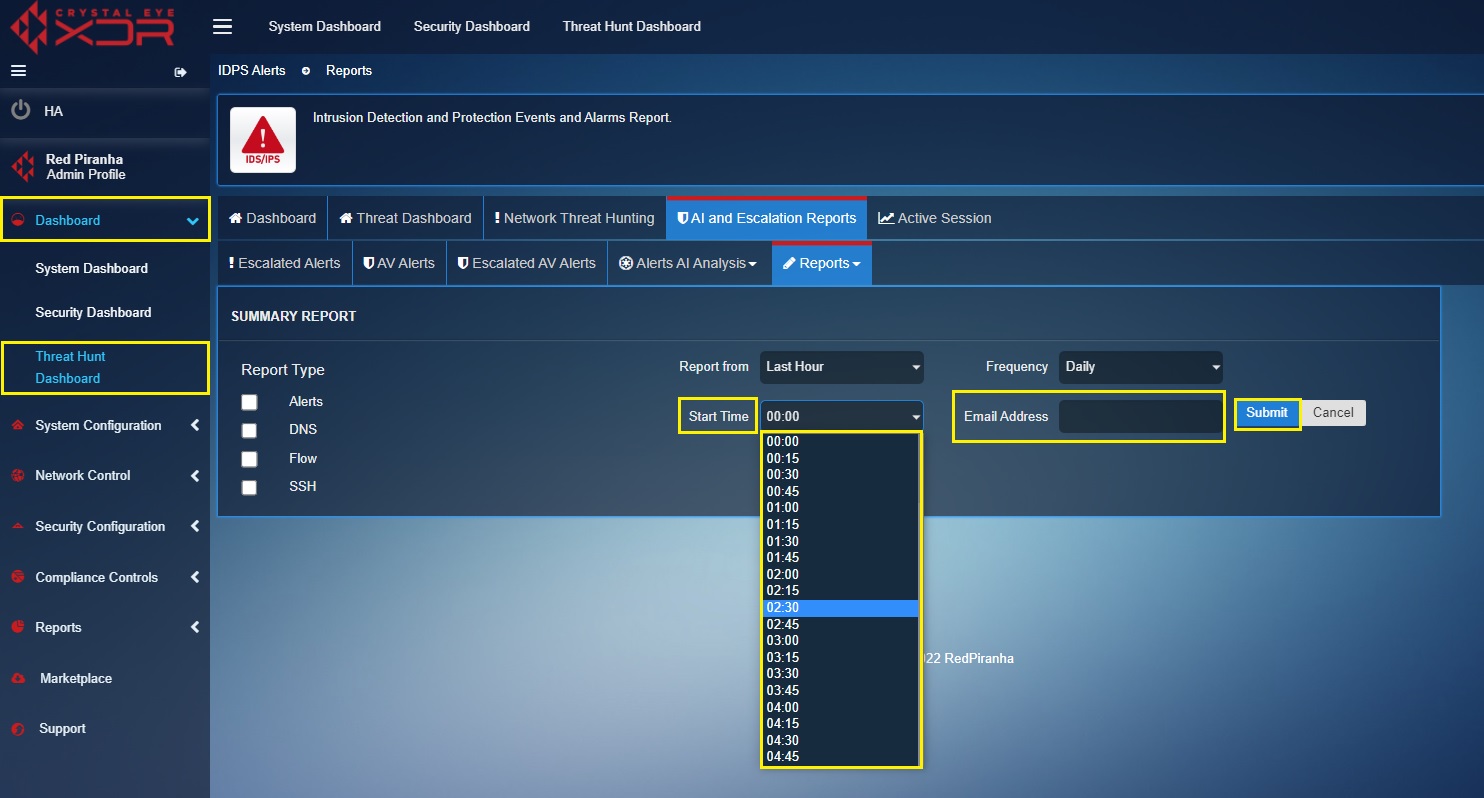
Step 1: Go to Threat Hunt Dashboard > AI and Escalation Reports > Reports > Summary Report
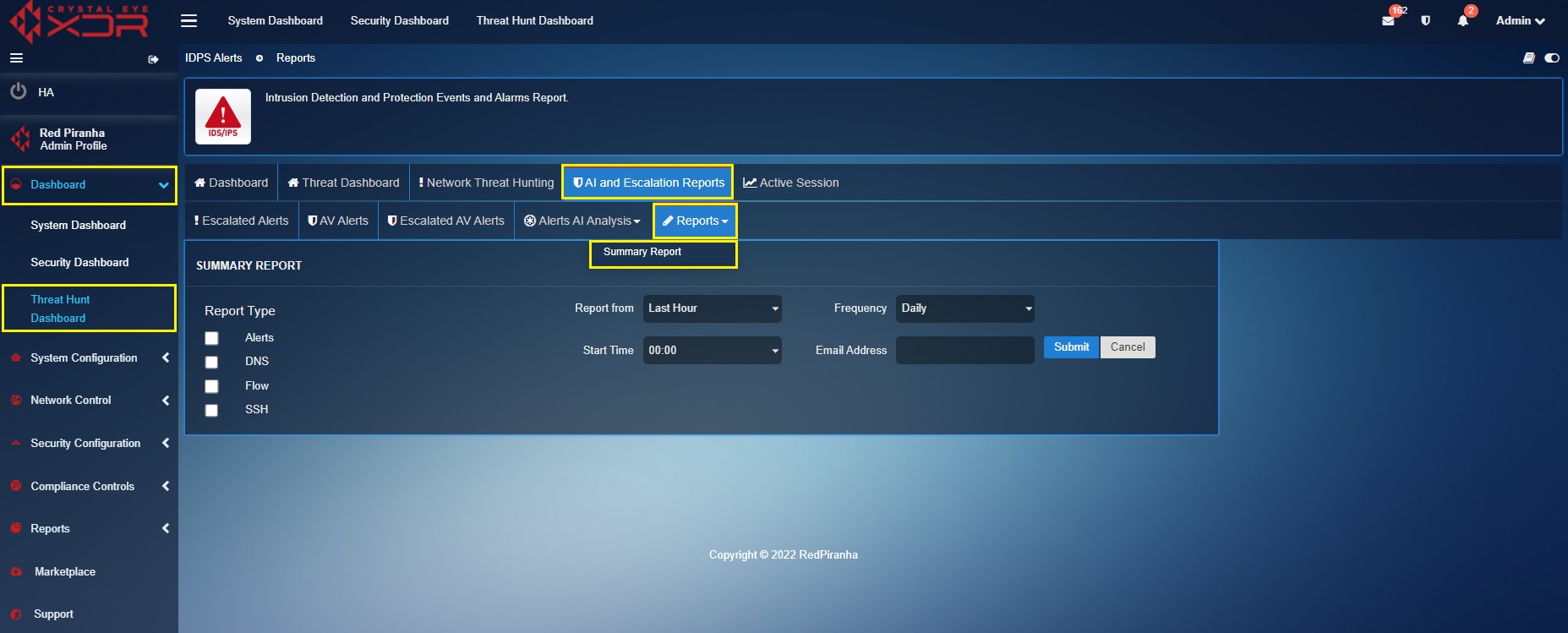
Step 2: Click the Add button on the top-right corner of the Summary Report section.

Step 3: You will now see the summary report scheduler. Select the IDPS Events Report Type as per requirements.
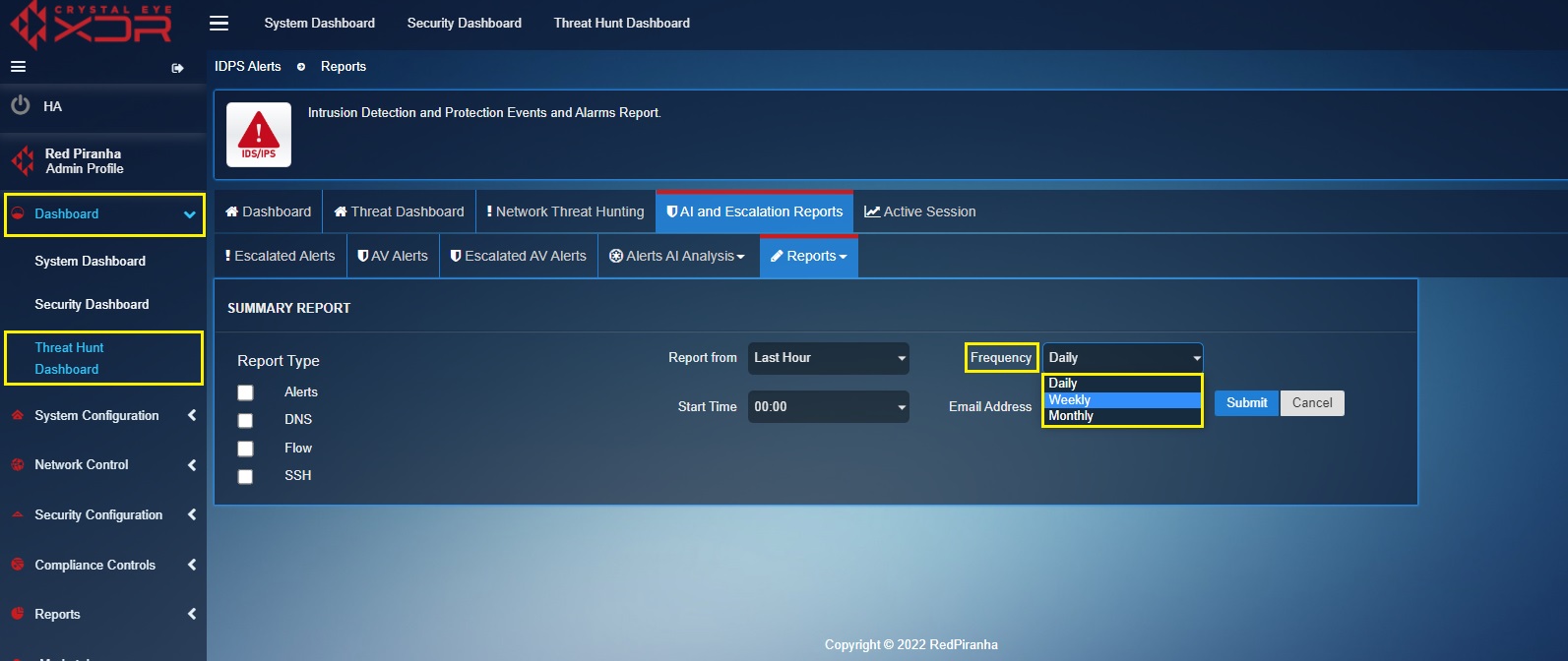
Step 4: Select the frequency of the report to be sent via email from the Frequency Dropdown.
Note
The frequency of the reports can be set to Daily, Weekly or Monthly.
Step 5: Select the time at which the report is to be sent to the designated email address, enter the email address in the textbox and click the Submit button.
Below is the explanation of the components of the downloaded IDPS Reports:
Alerts
- Top Alert Signature: It shows the top alert signature that has been detected by the Crystal Eye XDR for the time period selected while downloading the report. This monitoring metric also consists of the total counts of the top alerting signature.

-
Top Alert Category: It shows the top alert category of the signature that has been detected by the Crystal Eye XDR for the time period selected while downloading the report. This monitoring metric also consists of the total count of the top alert category of the signature.

-
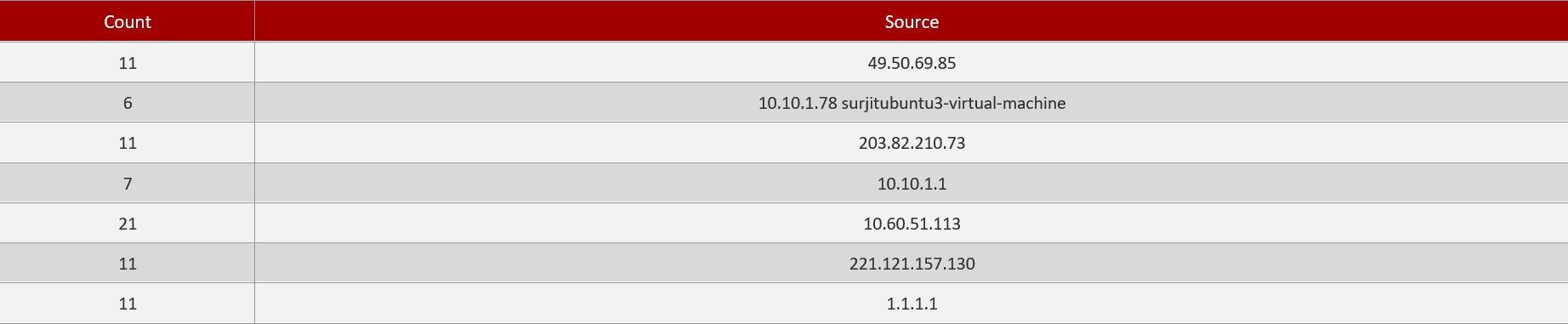
Top Alerting Source IPs: It shows the top alerting source IPs that has been detected by the Crystal Eye XDR for the time period selected while downloading the report. This monitoring metric also consists of the total count of the top alerting source IPs.
-
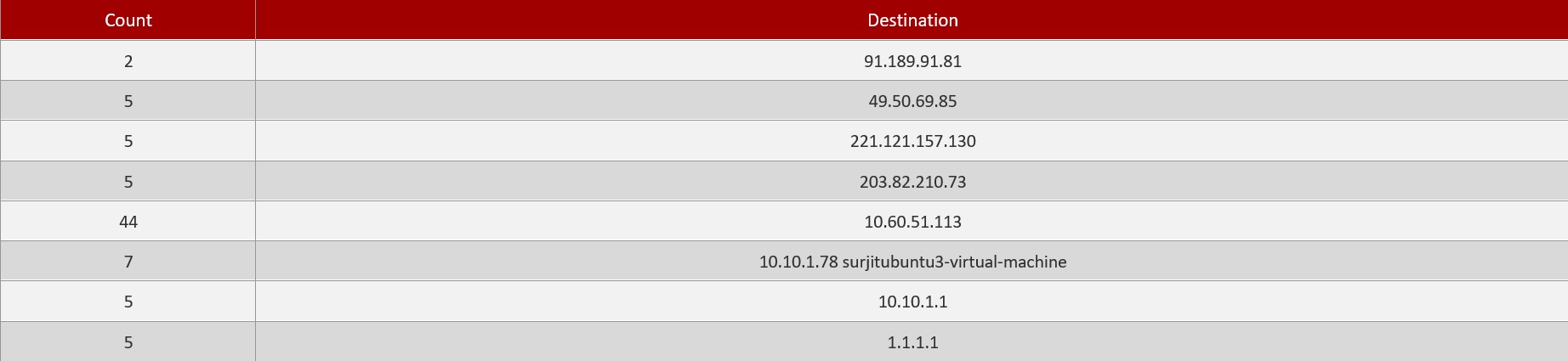
Top Alerting Destination IPs: It shows the top alerting destination IPs that has been detected by the Crystal Eye XDR for the time period selected while downloading the report. This monitoring metric also consists of the total count of the top alerting destination IPs.
-
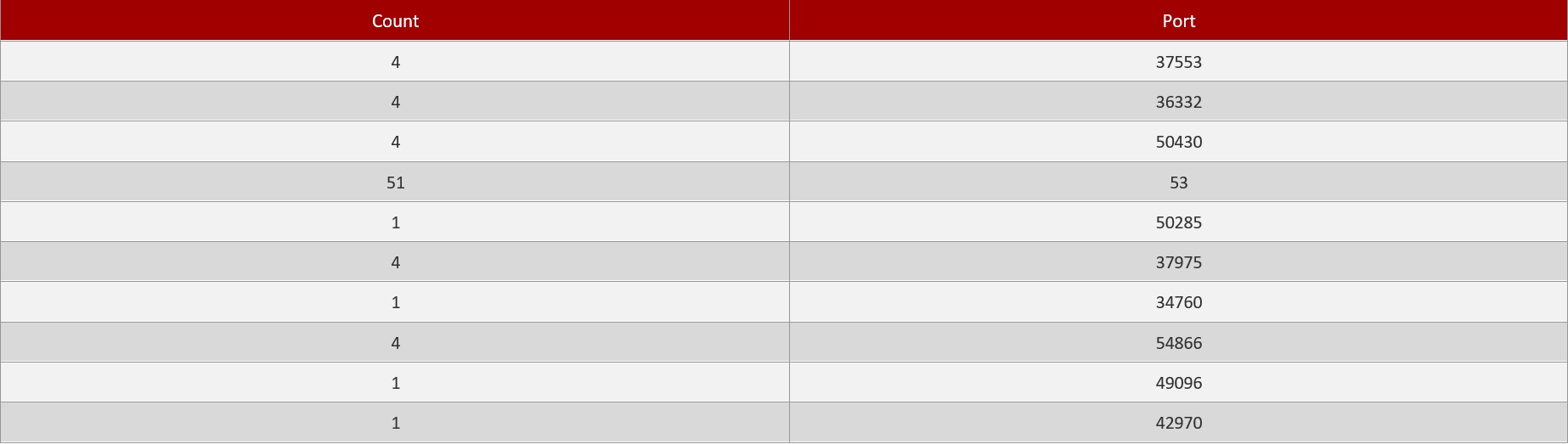
Top Alerting Source Ports: It shows the top alerting source ports that has been detected by the Crystal Eye XDR for the time period selected while downloading the report. This monitoring metric also consists of the total count of the top alerting source ports.
-
Top Alerting Destination Ports: It shows the top alerting destination ports that has been detected by the Crystal Eye XDR for the time period selected while downloading the report. This monitoring metric also consists of the total count of the top alerting destination ports.

Reports
-
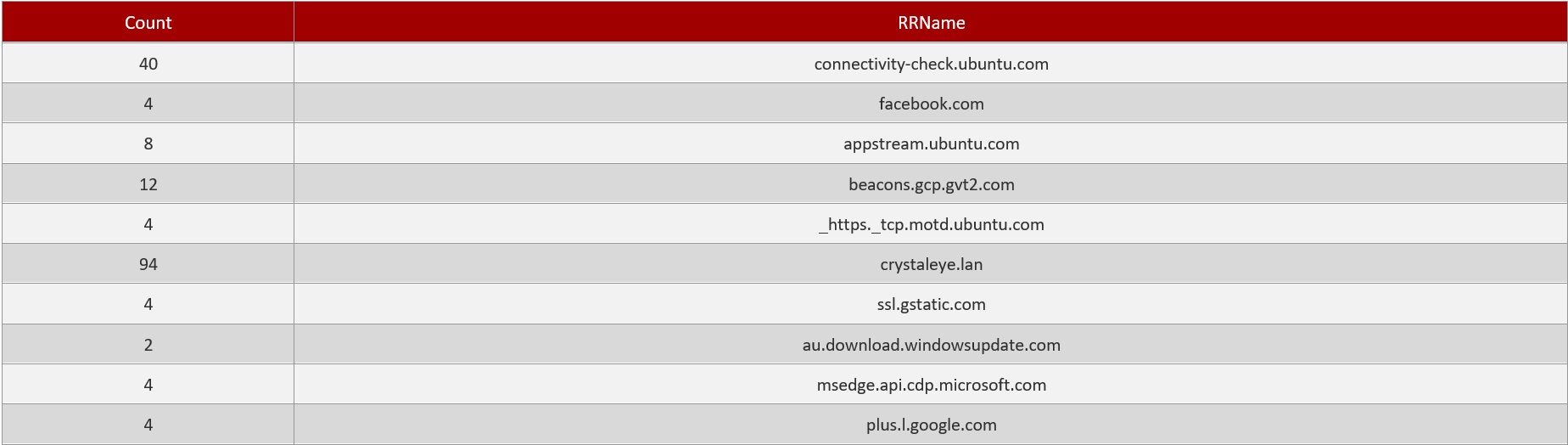
Top Request RRNames: It shows the top request RRNames that has been detected by the Crystal Eye XDR for the time period selected while downloading the report. This monitoring metric also consists of the total count of the top request RRNames.
-
Top DNS Servers: It shows the top DNS Servers that has been detected by the Crystal Eye XDR for the time period selected while downloading the report. This monitoring metric also consists of the total count of the top DNS Servers.

-
Top DNS Clients: It shows the top DNS Clients that has been detected by the Crystal Eye XDR for the time period selected while downloading the report. This monitoring metric also consists of the total count of the top DNS Clients.

-
Top Request Types: It shows the top Request types that has been detected by the Crystal Eye XDR for the time period selected while downloading the report. This monitoring metric also consists of the total count of the top Request Types.

-
Top Response Codes: It shows the top Response codes that has been detected by the Crystal Eye XDR for the time period selected while downloading the report. This monitoring metric also consists of the total count of the top Response Codes.

SSH
-
SSH Client Software: It shows the SSH Client Software name and version that has been detected by the Crystal Eye XDR for the time period selected while downloading the report. This monitoring metric also consists of the total count of the SSH Client Software detected by Crystal Eye XDR.

-
SSH Server Software: It shows the SSH Server Software name and version that has been detected by the Crystal Eye XDR for the time period selected while downloading the report. This monitoring metric also consists of the total count of the SSH Server Software detected by Crystal Eye XDR.

-
Top SSH Client Hosts: It shows the SSH Client Hosts address that has been detected by the Crystal Eye XDR for the time period selected while downloading the report. This monitoring metric also consists of the total count of the SSH Client hosts.

-
Top SSH Server Hosts: It shows the SSH Server Hosts address that has been detected by the Crystal Eye XDR for the time period selected while downloading the report. This monitoring metric also consists of the total count of the SSH Server hosts.
